# canvist
> canvist is a rich-text editor you build from plugins. A Rust core paints every pixel to a canvas, the same engine runs on servers (Rust, TypeScript, Dart) and in Flutter today, documents are Yjs-compatible, and typed APIs make calling an unregistered extension a compile error.
# canvist
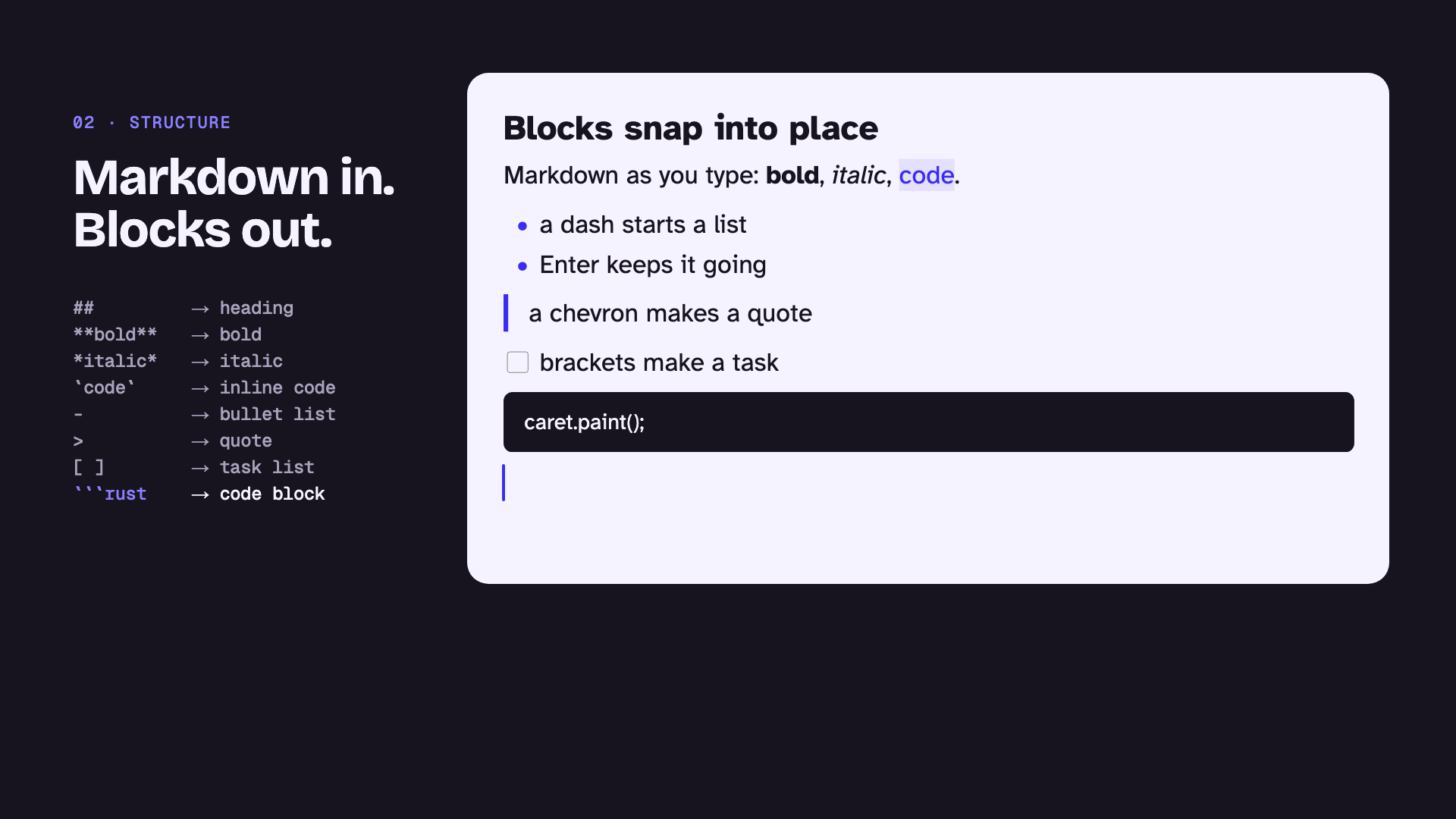
**canvist is a rich-text editor you build from plugins.** Start with plain paragraphs. Add bold, then headings, lists, links, and live collaboration. Stop wherever your app needs to stop, or keep going until you have your own Google Docs.
## Why canvist
- **You choose every feature.** Each feature is an extension: bold, headings, lists, tasks, links, and more. Register the ones you want and nothing else gets in. A comment box can be paragraphs and bold. A notes app can be the full StarterKit.
- **It draws every pixel itself.** canvist doesn't use `contenteditable` or the platform's text view. A Rust core lays the text out and paints it to a canvas, the way Google Docs and Figma do. So the editor looks and behaves the same everywhere.
- **One core, every platform.** The same engine runs on servers (Rust, TypeScript, Dart) and in Flutter today. Web, React, Vue, iOS, Android, desktop, React Native, and Lynx are on the way. [Check the status of your platform](https://canvist.dev/docs/quick-start).
- **Collaboration is built in.** Documents are [Yjs](https://yjs.dev)-compatible. Connect them to y-websocket, Hocuspocus, or [canvist Cloud](https://canvist.dev/docs/cloud).
- **Typed, headless APIs.** canvist ships no toolbar. You call typed commands and build your own UI on top. If you call a command from an extension you didn't register, your code doesn't compile. That catches the mistakes people and AI agents make most.
- **Free forever.** The code is released into the public domain under the [Unlicense](https://unlicense.org).
## See it in ten lines
This TypeScript runs on a server, in a script, or in a test. It registers two extensions, loads Markdown, makes a word bold, and exports HTML:
```ts
import { bold, createEngine, heading } from "@canvist/headless";
const engine = await createEngine([bold, heading]);
const doc = engine.parse("markdown", "# Notes\n\nShip it today");
doc.select({ path: [1], offset: 8 }, { path: [1], offset: 13 });
doc.commands.toggleBold();
console.log(doc.export("html"));
//
Notes
Ship it today
```
`doc.commands.toggleItalic()` would be a type error here, because italic isn't registered.
## Where to go next
- **[Quick start](https://canvist.dev/docs/quick-start):** install canvist on your platform and get a working document in five minutes.
- **[Core concepts](https://canvist.dev/docs/concepts/documents):** documents, extensions, commands, and selections, in a few short pages.
- **[Build your own editor](https://canvist.dev/docs/extensions/build-your-own-editor):** go from a minimal editor to a Google Docs-style one, one extension at a time.
- **[Integrate canvist with an agent](https://canvist.dev/docs/agents):** the steps and checklist for AI coding agents.
Source: https://canvist.dev/docs
---
# Pick your platform
Use this page to find your platform, see what works there today, and jump to a five-minute quick start.
Every platform runs the same Rust core, so documents, extensions, and commands behave the same everywhere. A document you create in Dart exports byte for byte the same as one created in Rust or TypeScript.
## What's available today
| Platform | Package | Status | Quick start |
| -------------------------------- | ---------------------------------- | ------------------------------------ | ------------------------------------------ |
| Server: Rust | `canvist_headless` | Available | [Rust](https://canvist.dev/docs/quick-start/server-rust) |
| Server: Node, Deno, Bun, Workers | `@canvist/headless` | Available | [TypeScript](https://canvist.dev/docs/quick-start/server-typescript) |
| Server: Dart | `canvist` | Available | [Dart](https://canvist.dev/docs/quick-start/server-dart) |
| Server-side rendering | `canvist_headless` (`ssr` feature) | Available in Rust; JavaScript soon | [SSR](https://canvist.dev/docs/quick-start/ssr) |
| Flutter | `canvist_flutter` | Engine available; editor widget soon | [Flutter](https://canvist.dev/docs/quick-start/flutter) |
| Web | `@canvist/web` | Preview | [Web](https://canvist.dev/docs/quick-start/web) |
| React | `@canvist/react` | Preview | [React](https://canvist.dev/docs/quick-start/react) |
| Vue | `@canvist/vue` | Preview | [Vue](https://canvist.dev/docs/quick-start/vue) |
| iOS | `Canvist` Swift package | Coming soon | [iOS](https://canvist.dev/docs/quick-start/ios) |
| Android | `canvist-android` | Coming soon | [Android](https://canvist.dev/docs/quick-start/android) |
| macOS, Windows, Linux | `canvist_desktop` | Coming soon | [Desktop](https://canvist.dev/docs/quick-start/desktop) |
| React Native and Lynx | `@canvist/react-native` | Coming soon | [React Native and Lynx](https://canvist.dev/docs/quick-start/react-native) |
**Available** means the package works and its tests run on every change. canvist hasn't had its first release yet, so every quick start shows how to install from GitHub, and the registry command for after the release.
## Which one do I need?
- **You're processing content on a server:** importing Markdown, cleaning pasted HTML, migrating TipTap JSON, or running a collaboration endpoint. Use the server package for your language.
- **You're building a Flutter app:** use `canvist_flutter`. Your engine code stays the same when the editor widget ships.
- **You want an editor in a web page:** use [`@canvist/web`](https://canvist.dev/docs/quick-start/web), or its [React](https://canvist.dev/docs/quick-start/react) and [Vue](https://canvist.dev/docs/quick-start/vue) bindings. Do server work with `@canvist/headless`.
- **You're an AI coding agent:** read [Integrate canvist with an agent](https://canvist.dev/docs/agents) first.
Source: https://canvist.dev/docs/quick-start
---
# Quick start: Rust
In this guide you load a document, edit it with typed commands, and export it, all from Rust. It takes about five minutes. The same engine powers every other canvist platform, so what you learn here carries over.
**Status: available.** `canvist_headless` works today. It goes to crates.io with the first release; until then, install it from GitHub.
## 1. Install
You need Rust 1.95 or newer.
```sh
cargo add canvist_headless --git https://github.com/canvist/canvist
```
The default build includes the StarterKit (paragraphs, headings, lists, tasks, quotes, code blocks, bold, italic, underline, strike, code, links, and undo). Two optional features add more:
| Feature | Adds |
| -------- | --------------------------------------------------------------------- |
| `collab` | Yjs collaboration: join, merge updates, and serve y-websocket clients |
| `ssr` | Server-side rendering to HTML and SVG |
```sh
cargo add canvist_headless --git https://github.com/canvist/canvist --features collab,ssr
```
## 2. Load, edit, and export a document
Replace `src/main.rs` with this:
```rust
use canvist_headless::Engine;
use canvist_headless::Format;
use canvist_headless::Position;
fn main() -> Result<(), canvist_headless::HeadlessError> {
// An engine holds your extensions. Build one and share it.
let engine = Engine::starter_kit();
let kit = engine.handles();
// A document is one piece of content you can edit.
let mut doc = engine.parse(Format::Markdown, "# Plan\n\nShip the docs")?;
// Select "docs" (block 1, characters 9 to 13) and make it bold.
doc.select_range(&Position::new([1], 9), &Position::new([1], 13))?;
doc.run(&kit.bold.toggle())?;
assert_eq!(
doc.export(Format::Html),
"
Plan
Ship the docs
"
);
assert_eq!(doc.export(Format::Markdown), "# Plan\n\nShip the **docs**");
Ok(())
}
```
Run it:
```sh
cargo run
```
## 3. Pick only the extensions you need
`Engine::starter_kit()` registers everything in the StarterKit. To build a smaller editor, register extensions one by one with `Engine::new`. It returns a typed handle for each extension you add:
```rust
use canvist_headless::Engine;
use canvist_headless::Format;
use canvist_headless::canvist_extensions::Bold;
use canvist_headless::canvist_extensions::Document;
use canvist_headless::canvist_extensions::Paragraph;
fn main() -> Result<(), canvist_headless::HeadlessError> {
let engine = Engine::new(|builder| {
builder.add(Document);
builder.add(Paragraph);
builder.add(Bold)
})?;
let bold = engine.handles();
let mut doc = engine.parse(Format::Text, "Hello")?;
doc.select_all()?;
doc.run(&bold.toggle())?;
assert_eq!(doc.export(Format::Markdown), "**Hello**");
Ok(())
}
```
This engine has no `italic` handle, so code that tries to make text italic can't compile. That's the point: the compiler checks your editor's features for you.
## Next steps
- [Import and export](https://canvist.dev/docs/guides/import-export) every format canvist reads and writes.
- [Server-side transforms](https://canvist.dev/docs/guides/server-transforms): script edits over many documents.
- [Collaboration](https://canvist.dev/docs/guides/collaboration): merge Yjs updates and serve y-websocket clients.
- [Server-side rendering](https://canvist.dev/docs/quick-start/ssr): render HTML and SVG that match the editor.
Source: https://canvist.dev/docs/quick-start/server-rust
---
# Quick start: TypeScript
In this guide you add canvist to a Node, Deno, Bun, or Workers project, then load, edit, and export a document with typed commands. It takes about five minutes.
`@canvist/headless` is canvist's engine compiled to WebAssembly, with no DOM. Use it in API routes, build scripts, CLIs, tests, and background jobs.
**Status: available.** The package works today. It goes to npm and JSR with the first release; until then, build it from source.
## 1. Install
After the first release:
```sh
npm install @canvist/headless # Node and Bun
deno add jsr:@canvist/headless # Deno
```
Until then, build the package once and install the tarball. You need Node 22 or newer, Rust, and [wasm-pack](https://rustwasm.github.io/wasm-pack/):
```sh
git clone https://github.com/canvist/canvist
cd canvist/packages/canvist-headless
npm ci && npm run build:wasm && npm pack
cd /path/to/your/app
npm install /path/to/canvist/packages/canvist-headless/canvist-headless-0.1.0.tgz
```
## 2. Load, edit, and export a document
Create `main.ts`:
```ts
import { createEngine } from "@canvist/headless";
// The StarterKit: paragraphs, headings, lists, tasks, quotes, code, marks, links.
const engine = await createEngine();
const doc = engine.parse("markdown", "# Plan\n\nShip the docs");
// Select "docs" (block 1, characters 9 to 13) and make it bold.
doc.select({ path: [1], offset: 9 }, { path: [1], offset: 13 });
doc.commands.toggleBold();
console.log(doc.query.isBold());
// true
console.log(doc.export("markdown"));
// # Plan
//
// Ship the **docs**
```
Run it:
```sh
node main.ts # Node 24 runs TypeScript directly
deno run main.ts # or Deno
bun main.ts # or Bun
```
## 3. Pick only the extensions you need
Pass the extensions you want to `createEngine`. Every document from that engine only has their commands, queries, blocks, and marks:
```ts
import { bold, createEngine, heading } from "@canvist/headless";
const engine = await createEngine([bold, heading]);
const doc = engine.create();
doc.commands.setHeading({ level: 2 });
console.log(doc.query.headingLevel());
// 2
// Neither of these compiles. `@ts-expect-error` marks the errors.
function mistakes() {
// @ts-expect-error: italic isn't registered.
doc.commands.toggleItalic();
// @ts-expect-error: headings go from 1 to 6.
doc.commands.setHeading({ level: 7 });
}
```
The types come from the same metadata the engine checks arguments against at runtime, so they can't drift. Code that skips the types, such as JavaScript, still gets a `CanvistError` with the code `invalidArgs`.
## Workers and other runtimes without a file system
In Cloudflare Workers and similar runtimes, import the WebAssembly module and pass it in:
```ts no_run
import { createEngine } from "@canvist/headless";
import wasm from "@canvist/headless/wasm/canvist_headless_wasm_bg.wasm";
export default {
async fetch(request: Request): Promise {
const engine = await createEngine(undefined, { wasm });
const doc = engine.parse("markdown", await request.text());
return Response.json(doc.toJson());
},
};
```
`createEngine` loads the module only once, so calling it per request is cheap after the first.
## Next steps
- [Import and export](https://canvist.dev/docs/guides/import-export) JSON, HTML, Markdown, and text.
- [Collaboration](https://canvist.dev/docs/guides/collaboration): run a y-websocket-compatible endpoint in about 30 lines.
- [Commands and typed handles](https://canvist.dev/docs/concepts/commands): run, check, and query commands.
Source: https://canvist.dev/docs/quick-start/server-typescript
---
# Quick start: Dart
In this guide you add canvist to a Dart project, then load, edit, and export a document with typed commands. It takes about five minutes. The package is pure Dart, with no Flutter, so it runs under `dart run`, `dart test`, and in compiled server binaries.
**Status: available.** The `canvist` package works today. It isn't on pub.dev yet, so install it from GitHub.
## 1. Install
You need Dart 3.13 or newer and a [Rust toolchain](https://rustup.rs). canvist's engine is written in Rust, and a Dart build hook compiles it the first time you run your app.
Add canvist to `pubspec.yaml`:
```yaml
dependencies:
canvist:
git:
url: https://github.com/canvist/canvist
path: platforms/dart
```
Then fetch it:
```sh
dart pub get
```
## 2. Load, edit, and export a document
Replace `bin/main.dart` with this:
```dart
import 'package:canvist/canvist.dart';
Future main() async {
// An engine holds your extensions. `kit` has a typed handle for each one.
final (:engine, :kit) = await Engine.starterKit();
final doc = engine.parse(Format.markdown, '# Plan\n\nShip the docs');
// Select "docs" (block 1, characters 9 to 13) and make it bold.
doc.select(const Position([1], 9), const Position([1], 13));
doc.run(kit.bold.toggleBold());
print(doc.query(kit.bold.isBold()));
// true
print(doc.export(Format.html));
//
Plan
Ship the docs
doc.dispose();
}
```
Run it. The first run compiles the Rust engine, which takes a minute or two:
```sh
dart run
```
## 3. Pick only the extensions you need
Register extensions on an `EngineBuilder`. Each call returns the extension's handle, and commands only exist on handles, so you can't call an extension you didn't register:
```dart
import 'package:canvist/canvist.dart';
Future main() async {
final builder = EngineBuilder();
final heading = builder.add(Extensions.heading);
final engine = await builder.build();
final doc = engine.create()..run(heading.setHeading(level: 2));
print(doc.query(heading.headingLevel()));
// 2
doc.dispose();
engine.dispose();
}
```
## Compile a server binary
The engine is a native library, so build executables with `dart build cli`, which bundles it. `dart compile exe` can't bundle native libraries, and its binaries fail at startup.
```sh
dart build cli
```
## Next steps
- [Flutter](https://canvist.dev/docs/quick-start/flutter): the same package, inside a Flutter app.
- [Collaboration](https://canvist.dev/docs/guides/collaboration): serve y-websocket clients from `dart:io`.
- [Import and export](https://canvist.dev/docs/guides/import-export) JSON, HTML, Markdown, and text.
Source: https://canvist.dev/docs/quick-start/server-dart
---
# Quick start: Server-side rendering
In this guide you render a canvist document to HTML and SVG on a server, laid out exactly as the editor paints it. Use it for fast first paint, SEO, readers without JavaScript, email, previews, and thumbnails.
**Status: available in Rust, coming soon for JavaScript.** Rendering ships today in `canvist_headless` behind the `ssr` feature. `@canvist/ssr`, for Next.js, Nuxt, and other JavaScript servers, is coming soon.
## 1. Install
```sh
cargo add canvist_headless --git https://github.com/canvist/canvist --features ssr
```
## 2. Render HTML and SVG
```rust
use canvist_headless::Engine;
use canvist_headless::Format;
use canvist_headless::Renderer;
fn main() -> Result<(), canvist_headless::HeadlessError> {
let doc =
Engine::starter_kit().parse(Format::Markdown, "# Release notes\n\n- Faster **typing**")?;
// Keep one renderer per thread: it caches text measurements.
let mut renderer = Renderer::new();
// Semantic HTML plus a stylesheet, laid out 640 pixels wide.
let html = renderer.html(&doc, 640.0);
assert!(html.html.starts_with(r#"
std::io::Result {
let mut renderer = Renderer::new();
// Returns the family names the font adds, such as `["Inter"]`.
let families = renderer.register_font(std::fs::read(path)?);
println!("registered {families:?}");
Ok(renderer)
}
```
To change colours, fonts, and spacing, see [Theming and styling](https://canvist.dev/docs/guides/theming).
## Hydrate in the browser
Put the HTML inside the element you pass to `createEditor` from [`@canvist/web`](https://canvist.dev/docs/quick-start/web#4-hydrate-server-rendered-html). The editor reads the document from it, keeps it on screen until fonts load, and swaps in the canvas without moving anything. Give the browser the same font files you registered here. `examples/web/ssr.html` in the repository is rendered by `cargo run -p canvist_headless --features ssr,starter-kit --example ssr_page`, and its test checks that hydration shifts nothing.
## Next steps
- [Import and export](https://canvist.dev/docs/guides/import-export): get your content into a document first.
- [Performance](https://canvist.dev/docs/guides/performance): what loading and rendering cost.
Source: https://canvist.dev/docs/quick-start/ssr
---
# Quick start: Flutter
In this guide you add canvist's engine to a Flutter app and drive a document from your own widgets. It takes about five minutes.
**Status: engine available, editor widget coming soon.** `canvist_flutter` gives your app the full engine today: documents, typed commands, every format, and collaboration. It doesn't include the canvas editor widget yet, so you show the document with your own widgets for now. When the widget lands, the engine code you write today keeps working.
## 1. Install
You need Flutter 3.47 or newer and a [Rust toolchain](https://rustup.rs). The engine is written in Rust, and a build hook compiles it for each platform you build.
Add the package to `pubspec.yaml`. It isn't on pub.dev yet, so install it from GitHub:
```yaml
dependencies:
canvist_flutter:
git:
url: https://github.com/canvist/canvist
path: platforms/flutter
```
```sh
flutter pub get
```
## 2. Load the engine and edit a document
Load the engine once, before `runApp`. Then create documents and run commands from your widgets. This app adds what you type to a document, has a button that toggles bold, and shows the result as Markdown:
```dart
import 'package:canvist_flutter/canvist_flutter.dart';
import 'package:flutter/material.dart';
Future main() async {
WidgetsFlutterBinding.ensureInitialized();
final (:engine, :kit) = await Engine.starterKit();
runApp(MaterialApp(home: NotesScreen(engine: engine, kit: kit)));
}
class NotesScreen extends StatefulWidget {
const NotesScreen({super.key, required this.engine, required this.kit});
final Engine engine;
final StarterKitHandles kit;
@override
State createState() => _NotesScreenState();
}
class _NotesScreenState extends State {
late final Doc _doc = widget.engine.create();
final _draft = TextEditingController();
String _markdown = '';
void _addText() {
final end = _doc.export(Format.text).length;
_doc
..select(Position([0], end))
..insertText(_draft.text);
_draft.clear();
_refresh();
}
void _toggleBold() {
_doc
..selectAll()
..run(widget.kit.bold.toggleBold());
_refresh();
}
void _refresh() => setState(() => _markdown = _doc.export(Format.markdown));
@override
void dispose() {
_draft.dispose();
_doc.dispose();
super.dispose();
}
@override
Widget build(BuildContext context) {
return Scaffold(
appBar: AppBar(
title: const Text('Notes'),
actions: [
IconButton(
icon: const Icon(Icons.format_bold),
onPressed: _toggleBold,
),
],
),
body: Padding(
padding: const EdgeInsets.all(16),
child: Column(
children: [
TextField(controller: _draft, onSubmitted: (_) => _addText()),
const SizedBox(height: 16),
SelectableText(_markdown),
],
),
),
);
}
}
```
Run it on any device:
```sh
flutter run
```
## Next steps
- [Quick start: Dart](https://canvist.dev/docs/quick-start/server-dart): the same engine on a Dart server.
- [Commands and typed handles](https://canvist.dev/docs/concepts/commands): toolbar buttons map one-to-one onto commands.
- [Collaboration](https://canvist.dev/docs/guides/collaboration): sync documents with Yjs.
Source: https://canvist.dev/docs/quick-start/flutter
---
# Quick start: Web
In this guide you put a live canvist editor on a web page with `@canvist/web`, add a toolbar that follows the selection, and set up a bundler. It takes about five minutes.
**Status: preview.** `@canvist/web` works in Chromium, Firefox, and Safari, and its API may still change before 1.0. Using React or Vue? See [React](https://canvist.dev/docs/quick-start/react) and [Vue](https://canvist.dev/docs/quick-start/vue).
## 1. Install
```sh
npm install @canvist/web
```
## 2. Create an editor
Give the editor an element with a width. Without a height, it grows with its document and the page scrolls:
```html
```
```ts no_run
import { createEditor } from "@canvist/web";
const element = document.querySelector("#editor");
const bold = document.querySelector("#bold");
if (element !== null && bold !== null) {
const editor = await createEditor(element, {
content: { format: "markdown", input: "# Hello\n\nStart typing." },
label: "Notes",
});
// Keep the button in step with the selection.
const refresh = () => {
bold.disabled = !editor.can.toggleBold();
bold.setAttribute("aria-pressed", String(editor.query.isBold()));
};
editor.subscribe(refresh);
refresh();
bold.addEventListener("click", () => {
editor.commands.toggleBold();
editor.focus();
});
}
```
The editor paints on a canvas, but it types, selects, copies, pastes, and composes text from input methods as a text field does, and screen readers read it. [Text input on the web](https://canvist.dev/docs/guides/web-input) explains how.
Commands, queries, and `can` checks are typed from the extensions you pass (TipTap's StarterKit by default). Calling one you didn't register is a type error.
## 3. Set up your bundler
`@canvist/web` loads a WebAssembly module from next to its own files, and bundlers that follow `new URL(…, import.meta.url)` copy it for you. In Vite, exclude canvist from dependency pre-bundling, which would move the modules away from it:
```ts no_run
// vite.config.ts
export default {
optimizeDeps: { exclude: ["@canvist/web", "@canvist/headless"] },
};
```
To serve the module yourself, pass its URL as `wasm` in the options.
## 4. Hydrate server-rendered HTML
canvist's [server renderer](https://canvist.dev/docs/quick-start/ssr) sends the document as HTML that wraps exactly where the editor does. Render it into the editor's element, and `createEditor` reads the document from it. It keeps the HTML on screen until your fonts have loaded, then swaps in the canvas in one frame, so nothing moves:
```ts no_run
import { createEditor } from "@canvist/web";
// The element already holds the server's `
…
`.
const element = document.querySelector("#editor");
if (element !== null) {
const editor = await createEditor(element, {
// The theme the server rendered with.
theme: { bodyFamily: "Inter, sans-serif" },
});
await editor.ready(); // the canvas is showing now
}
```
The server and the browser must lay text out with the same font files. [Fonts and text rendering](https://canvist.dev/docs/guides/fonts#render-the-same-fonts-on-your-server) shows how.
## Run the examples
`examples/web` in the repository has a plain page, React, Vue, and a server-rendered page, each with a Playwright test:
```sh
cd examples/web
npm install
npm run ssr # renders ssr.html with the Rust renderer
npm run dev
```
Source: https://canvist.dev/docs/quick-start/web
---
# Quick start: React
In this guide you add a canvist editor to a React app with `@canvist/react`, and build a toolbar that re-renders when the selection changes.
**Status: preview.** `@canvist/react` wraps [`@canvist/web`](https://canvist.dev/docs/quick-start/web), which is a preview. Its API may still change before 1.0.
## 1. Install
```sh
npm install @canvist/react @canvist/web
```
With Vite, exclude canvist from dependency pre-bundling, as [the web quick start](https://canvist.dev/docs/quick-start/web#3-set-up-your-bundler) shows.
## 2. Add an editor and a toolbar
`useCanvistEditor` creates the editor in the element you attach `ref` to, and destroys it on unmount. `useEditorState` re-renders the component when the value it reads changes:
```tsx
import { useCanvistEditor, useEditorState } from "@canvist/react";
export function Notes() {
const { ref, editor } = useCanvistEditor({
content: { format: "markdown", input: "# Notes\n\nStart typing." },
label: "Notes",
});
const canBold = useEditorState(
editor,
(current) => current.can.toggleBold(),
false,
);
const isBold = useEditorState(
editor,
(current) => current.query.isBold(),
false,
);
return (
<>
);
}
```
- **The editor is `null` until its WebAssembly has loaded.** Give `useEditorState` a fallback for that moment.
- **Options are read once.** Change the document later with `editor.setContent`.
- **Types follow your extensions.** Pass `extensions: [bold, heading]`, and `editor.commands.toggleItalic()` is a type error.
- **A selector must return a primitive or a stable object**, as with React's `useSyncExternalStore`.
## 3. Or use the component
`CanvistEditor` takes the same options as props, plus `onReady` and `onUpdate`:
```tsx
import { CanvistEditor } from "@canvist/react";
export function Comment() {
return (
console.log(editor.export("markdown"))}
style={{ maxWidth: 640 }}
/>
);
}
```
To hydrate server-rendered HTML, pass it as `html`. The editor reads the document from it and swaps in the canvas once fonts are ready, with no layout shift.
`examples/web/src/react.tsx` in the repository is a complete app.
Source: https://canvist.dev/docs/quick-start/react
---
# Quick start: Vue
In this guide you add a canvist editor to a Vue app with `@canvist/vue`, and build a toolbar that follows the selection.
**Status: preview.** `@canvist/vue` wraps [`@canvist/web`](https://canvist.dev/docs/quick-start/web), which is a preview. Its API may still change before 1.0.
## 1. Install
```sh
npm install @canvist/vue @canvist/web
```
With Vite, exclude canvist from dependency pre-bundling, as [the web quick start](https://canvist.dev/docs/quick-start/web#3-set-up-your-bundler) shows.
## 2. Add an editor and a toolbar
`useCanvistEditor` creates the editor in the element bound to `element` when the component mounts, and destroys it on unmount. `useEditorState` returns a ref that updates after every change:
```vue
```
- **The editor is `null` until its WebAssembly has loaded.** Give `useEditorState` a fallback for that moment.
- **Options are read once.** Change the document later with `editor.value.setContent`.
- **Types follow your extensions.** Pass `extensions: [bold, heading]`, and `editor.value.commands.toggleItalic()` is a type error.
## 3. Or use the component
`CanvistEditor` takes the same options as props, and emits `ready` and `update` with the editor:
```vue
```
To hydrate server-rendered HTML, pass it as `html`. The editor reads the document from it and swaps in the canvas once fonts are ready, with no layout shift.
`examples/web/src/App.vue` in the repository is a complete app.
Source: https://canvist.dev/docs/quick-start/vue
---
# Quick start: iOS
Use this page to see what's planned for iOS and what you can build with canvist today.
**Status: coming soon.** The native iOS editor isn't available yet. It will be a `CanvistView` in a Swift package, built on `UITextInput`, so autocorrect, dictation, and the selection loupe work as they do in native text views. It will draw with CoreText and CoreGraphics, and follow Dynamic Type.
## What you can do today
- **Build with Flutter.** [`canvist_flutter`](https://canvist.dev/docs/quick-start/flutter) runs the full engine on iOS today.
- **Process content on your server.** Use the [Rust](https://canvist.dev/docs/quick-start/server-rust), [TypeScript](https://canvist.dev/docs/quick-start/server-typescript), or [Dart](https://canvist.dev/docs/quick-start/server-dart) packages.
Watch [the releases](https://github.com/canvist/canvist/releases) to hear when it ships.
Source: https://canvist.dev/docs/quick-start/ios
---
# Quick start: Android
Use this page to see what's planned for Android and what you can build with canvist today.
**Status: coming soon.** The native Android editor isn't available yet. It will be a `CanvistView` with its own `InputConnection`, tested against Gboard and Samsung Keyboard, and published to Maven Central as `io.github.ifiokjr:canvist-android`. It will work in both Views and Jetpack Compose.
## What you can do today
- **Build with Flutter.** [`canvist_flutter`](https://canvist.dev/docs/quick-start/flutter) runs the full engine on Android today.
- **Process content on your server.** Use the [Rust](https://canvist.dev/docs/quick-start/server-rust), [TypeScript](https://canvist.dev/docs/quick-start/server-typescript), or [Dart](https://canvist.dev/docs/quick-start/server-dart) packages.
Watch [the releases](https://github.com/canvist/canvist/releases) to hear when it ships.
Source: https://canvist.dev/docs/quick-start/android
---
# Quick start: Desktop
Use this page to see what's planned for Desktop and what you can build with canvist today.
**Status: coming soon.** The native desktop editor for macOS, Windows, and Linux isn't available yet. It will be a Rust crate that opens a window with `winit`, paints with `vello`, shapes text with `parley`, and exposes an accessibility tree through AccessKit.
## What you can do today
- **Use the engine from Rust.** [`canvist_headless`](https://canvist.dev/docs/quick-start/server-rust) gives a Rust app the full document model, typed commands, and every format.
- **Render documents.** The `ssr` feature [renders HTML and SVG](https://canvist.dev/docs/quick-start/ssr) exactly as the editor lays them out, which works for previews and thumbnails.
- **Build with Flutter.** [`canvist_flutter`](https://canvist.dev/docs/quick-start/flutter) runs the engine in Flutter desktop apps.
Watch [the releases](https://github.com/canvist/canvist/releases) to hear when it ships.
Source: https://canvist.dev/docs/quick-start/desktop
---
# Quick start: React Native and Lynx
Use this page to see what's planned for React Native and Lynx and what you can build with canvist today.
**Status: coming soon.** `@canvist/react-native` and `@canvist/lynx` aren't available yet. They will wrap the native iOS and Android editors, not a WebView, so typing feels native and your app keeps one JavaScript API for commands.
## What you can do today
- **Use the engine in JavaScript.** [`@canvist/headless`](https://canvist.dev/docs/quick-start/server-typescript) runs in any runtime with WebAssembly. Use it on your server to prepare and convert content.
- **Learn the model now.** These packages will use the same [extensions](https://canvist.dev/docs/concepts/extensions) and [typed commands](https://canvist.dev/docs/concepts/commands) as every other platform.
Watch [the releases](https://github.com/canvist/canvist/releases) to hear when they ship.
Source: https://canvist.dev/docs/quick-start/react-native
---
# Documents and blocks
Read this page to understand what a canvist document is made of, so you can predict how content loads, changes, and exports.
## A document is a tree of blocks
A document holds blocks, in order. There are three kinds:
- **Text blocks** hold one run of text: paragraphs, headings, and code blocks.
- **Container blocks** hold other blocks: lists, list items, task items, and quotes.
- **Leaf blocks** hold nothing: a horizontal rule.
A document always has at least one block. A new, empty document is one empty paragraph.
## Text carries marks and embeds
Formatting inside a text block is a **mark**: bold, italic, underline, strike, inline code, and links. A mark covers a range of characters, and ranges can overlap, so text can be bold and italic at once. Some marks carry attributes; a link carries its `href`.
An **embed** is an inline object that sits inside the text, such as a hard line break. It takes up one character.
## Extensions define what a document may contain
Every block type and mark comes from an [extension](https://canvist.dev/docs/concepts/extensions). An engine with only `bold` registered knows paragraphs and bold, and nothing else. That set of types is the document's **schema**.
What happens to content the schema doesn't know depends on how it arrives:
- **JSON must fit the schema.** Loading JSON with an unknown block type fails with the error code `schema`, so bad data never gets in silently.
- **HTML, Markdown, and text always load.** Anything without a matching type becomes a paragraph or plain text, so pasted and imported content never fails.
## Documents are TipTap-compatible JSON
canvist's JSON is the same ProseMirror JSON TipTap uses, with the same type names. You can move documents between TipTap and canvist without converting them.
```ts
import { createEngine } from "@canvist/headless";
const engine = await createEngine();
const doc = engine.parse("markdown", "Buy **milk**");
console.log(JSON.stringify(doc.toJson()));
// {"content":[{"attrs":{"id":"1.0"},"content":[{"text":"Buy ","type":"text"},{"marks":[{"type":"bold"}],"text":"milk","type":"text"}],"type":"paragraph"}],"type":"doc"}
```
Each block carries a stable id in `attrs.id`, the attribute TipTap's UniqueID extension uses. Ids let comments, remote carets, and collaborators keep pointing at the same block while the document changes around it.
In TypeScript, `toJson()` and `fromJson()` are typed by the engine's extensions, so JSON with a block type you didn't register is a type error as well as a runtime error.
## Formats
A document reads and writes four formats. See [Import and export](https://canvist.dev/docs/guides/import-export) for the details of each.
| Format | Name in code | Reading it | Writing it |
| ---------- | ------------ | ---------------------------------------------------------- | ------------------------------------------- |
| JSON | `json` | Must fit the schema, or loading fails | Keeps everything, including block ids |
| HTML | `html` | Never fails; unknown tags fall back to paragraphs and text | Semantic HTML: `
`, `
`, ``, … |
| Markdown | `markdown` | Never fails; GitHub task lists and strikethrough included | Markdown |
| Plain text | `text` | One paragraph per line | One line per text block |
Use JSON to store documents. It is the only format that keeps everything, including attributes that HTML and Markdown can't express.
## Next
- [Extensions](https://canvist.dev/docs/concepts/extensions): choose what your documents may contain.
- [Selections and positions](https://canvist.dev/docs/concepts/selections): point at places inside a document.
Source: https://canvist.dev/docs/concepts/documents
---
# Extensions
Read this page to learn how extensions shape your editor, so you can register exactly the features your app needs.
## Every feature is an extension
canvist starts with almost nothing: a document, paragraphs, and the standard editing keys (typing, Backspace, Enter, arrows). Everything else is an extension you register:
- **Bold** adds the `bold` mark, `Mod-b`, `**text**` as you type, and the `toggleBold` command.
- **Heading** adds the `heading` block, `#` to `######` as you type, `Mod-Alt-1` to `Mod-Alt-6`, and the `setHeading` command.
- **Task list** adds task lists and task items, `[ ]` as you type, and commands to check and uncheck tasks.
An extension can contribute any of these:
| Part | What it does | Example |
| ------------------ | --------------------------------------------------- | ------------------------------ |
| Schema | The blocks, marks, and embeds documents may contain | `heading`, `bold`, `hardBreak` |
| Commands | Changes you can run against the selection | `toggleBold`, `setHeading` |
| Queries | Questions about the selection | `isBold`, `headingLevel` |
| Keyboard shortcuts | Keys that run commands | `Mod-b`, `Mod-Shift-8` |
| Input rules | Text patterns that format as you type | `##` → heading, `-` → list |
| Paste rules | Formatting applied to pasted text | A pasted URL becomes a link |
The [extension catalogue](https://canvist.dev/docs/extensions) lists every extension with its commands.
## Register only what you need
Fewer extensions means a smaller schema, fewer commands to reason about, and content that can only take the shapes you allow. A comment box doesn't need tables. A chat input doesn't need headings.
```ts
import { bold, createEngine, italic, link } from "@canvist/headless";
// A comment box: paragraphs, bold, italic, and links.
const engine = await createEngine([bold, italic, link]);
const doc = engine.parse("markdown", "## Not a heading here\n\nJust **text**");
console.log(doc.export("markdown"));
// Not a heading here
//
// Just **text**
```
The heading became a plain paragraph, because this engine has no `heading` block.
## The StarterKit
The StarterKit is TipTap's starter set in one call: paragraphs, headings, quotes, code blocks, hard breaks, horizontal rules, bullet, ordered, and task lists, bold, italic, underline, strike, inline code, links, undo and redo, and a trailing paragraph. It's the default when you don't pass a list:
```ts
import { createEngine } from "@canvist/headless";
const engine = await createEngine(); // the StarterKit
console.log(engine.extensions.length);
// 21
```
The count includes the four extensions every engine has: the document, paragraphs, the standard keys, and undoing an input rule with Backspace.
## In Rust, features are compiled out too
In Rust, each extension sits behind a Cargo feature of `canvist_extensions`, so extensions you don't enable aren't compiled at all. Register extensions with `Engine::new`, and each `builder.add` returns that extension's typed handle. `Engine::new` registers exactly what you add, so include `Document` and `Paragraph`, and `BaseKeymap` if you want the standard editing keys:
```rust
use canvist_headless::Engine;
use canvist_headless::Format;
use canvist_headless::canvist_extensions::Bold;
use canvist_headless::canvist_extensions::Document;
use canvist_headless::canvist_extensions::Heading;
use canvist_headless::canvist_extensions::HeadingLevel;
use canvist_headless::canvist_extensions::Paragraph;
fn main() -> Result<(), canvist_headless::HeadlessError> {
let engine = Engine::new(|builder| {
builder.add(Document);
builder.add(Paragraph);
(builder.add(Bold), builder.add(Heading::default()))
})?;
let (bold, heading) = engine.handles();
let mut doc = engine.parse(Format::Text, "Title")?;
doc.select_all()?;
doc.run(&heading.set(HeadingLevel::H2))?;
doc.run(&bold.toggle())?;
assert_eq!(doc.export(Format::Markdown), "## **Title**");
Ok(())
}
```
## Your own extensions
The extensions in the catalogue are built on the public `Extension` trait in `canvist_editor`, and you can implement it yourself in Rust. A custom extension can add blocks, marks, and embeds, plus commands, queries, keyboard shortcuts, and input rules. [Build your own editor](https://canvist.dev/docs/extensions/build-your-own-editor#add-your-own-extension) walks through one.
Two limits today:
- **The bindings register StarterKit extensions by name.** TypeScript and Dart can't load a custom Rust extension yet.
- **Formats and rendering know the StarterKit's types.** A custom block exports as its text in HTML and Markdown, and JSON keeps it whole.
## Next
- [Commands and typed handles](https://canvist.dev/docs/concepts/commands): run, check, and query what extensions add.
- [Build your own editor](https://canvist.dev/docs/extensions/build-your-own-editor): grow an editor one extension at a time.
Source: https://canvist.dev/docs/concepts/extensions
---
# Commands and typed handles
Read this page to learn the four things you do with an extension: run its commands, check whether they would apply, ask about the selection, and react to keys. Every toolbar button, shortcut, and script is built from these.
## Run a command
A command changes the document at the current selection. Running it returns `true` if it changed something and `false` if it didn't apply, for example toggling a heading inside a code block.
```ts
import { createEngine } from "@canvist/headless";
const engine = await createEngine();
const doc = engine.parse("markdown", "Hello world");
doc.select({ path: [0], offset: 6 }, { path: [0], offset: 11 });
console.log(doc.commands.toggleBold());
// true
console.log(doc.export("markdown"));
// Hello **world**
```
## Check before you run
`can` runs a command as a dry run. Nothing changes. Use it to enable and disable toolbar buttons.
```ts
import { createEngine } from "@canvist/headless";
const engine = await createEngine();
const doc = engine.parse("markdown", "- first\n- second");
// The caret is in the first list item, which has no item before it to nest under.
doc.select({ path: [0, 0, 0], offset: 0 });
console.log(doc.can.sinkListItem());
// false
// The second item can nest under the first.
doc.select({ path: [0, 1, 0], offset: 0 });
console.log(doc.can.sinkListItem());
// true
```
## Ask about the selection
Queries answer questions about the selection: is bold active, what heading level is this, what does this link point to. Use them to show active state in your UI.
```ts
import { createEngine } from "@canvist/headless";
const engine = await createEngine();
const doc = engine.parse(
"markdown",
"## Title\n\nSee [the docs](https://example.com)",
);
doc.select({ path: [0], offset: 0 });
console.log(doc.query.headingLevel());
// 2
doc.select({ path: [1], offset: 6 });
console.log(doc.query.linkHref());
// https://example.com
```
## Keys and typing
`press` runs a key through the keyboard shortcuts and `typeText` types characters one by one, running input rules as it goes. That's how a user's keystrokes reach the engine, and it's handy in tests:
```ts
import { createEngine } from "@canvist/headless";
const engine = await createEngine();
const doc = engine.create();
doc.typeText("## Shopping");
doc.press("Enter");
doc.typeText("[ ] milk");
console.log(doc.export("markdown"));
// ## Shopping
//
// - [ ] milk
```
`Mod` means Cmd on Apple platforms and Ctrl elsewhere, so `doc.press("Mod-b")` toggles bold on every platform.
## Typed handles
Commands and queries only exist for extensions you registered. Each language enforces that in its own way:
| Language | How you reach a command | Calling an unregistered extension |
| ---------- | ------------------------------------------------------------------------------------- | --------------------------------- |
| TypeScript | `doc.commands.toggleBold()` | Type error |
| Rust | `doc.run(&bold.toggle())`, with the handle `builder.add(Bold)` returned | Compile error: there's no handle |
| Dart | `doc.run(bold.toggleBold())`, with the handle `builder.add(Extensions.bold)` returned | Compile error: there's no handle |
Arguments are typed too. A heading level is `1 | 2 | 3 | 4 | 5 | 6` in TypeScript, and the engine checks it again at runtime for code that skips the types.
## Commands by name
When the command comes from data, such as a menu definition, a saved macro, or an AI agent's tool call, run it by name. The engine checks the name and arguments against the registered extensions and fails with a clear error code if they don't match:
```ts
import { createEngine, isCanvistError } from "@canvist/headless";
const engine = await createEngine();
const doc = engine.parse("text", "Title");
doc.selectAll();
console.log(doc.run("setHeading", { level: 1 }));
// true
// A call that arrived as data, such as an agent's tool call.
const call = JSON.parse('{ "name": "setHeading", "args": { "level": 9 } }');
try {
doc.run(call.name, call.args);
} catch (error) {
if (!isCanvistError(error)) throw error;
console.log(error.code);
// invalidArgs
}
```
In Rust, the same calls are `doc.run_named(name, &args)` and `doc.query(name, &args)`. In Dart, they're `doc.runNamed` and `doc.queryNamed`.
## Next
- [Selections and positions](https://canvist.dev/docs/concepts/selections): choose where commands apply.
- [Add a toolbar](https://canvist.dev/docs/guides/toolbar): turn commands, `can`, and queries into buttons.
Source: https://canvist.dev/docs/concepts/commands
---
# Selections and positions
Read this page to learn how to point at a place in a document, so your commands apply exactly where you mean.
## Positions
A position is a **path** to a text block and an **offset** inside its text:
- `path` walks the block tree from the root. `[0]` is the first top-level block. `[1, 0, 0]` is the first block inside the first item of the second top-level block, such as the paragraph in a list item.
- `offset` counts UTF-16 code units, the way JavaScript and Dart index strings. In Rust, use the same unit, not byte offsets.
Positions mean the same thing in Rust, TypeScript, and Dart, so a position your server stores works in every client.
```text
# Plan [0]
- Write the docs [1, 0, 0] (bulletList → listItem → paragraph)
- Ship [1, 1, 0]
```
## Selections
A selection has an **anchor**, where it started, and a **head**, where it ends. When they're equal, the selection is a caret. The head can come before the anchor, as it does when someone selects backwards.
```ts
import { createEngine } from "@canvist/headless";
const engine = await createEngine();
const doc = engine.parse("markdown", "# Plan\n\n- Write the docs\n- Ship");
// A caret after "Write".
doc.select({ path: [1, 0, 0], offset: 5 });
// "the docs" in the first item.
doc.select({ path: [1, 0, 0], offset: 6 }, { path: [1, 0, 0], offset: 14 });
doc.commands.toggleItalic();
// Everything.
doc.selectAll();
console.log(doc.query.isItalic());
// false
console.log(doc.export("markdown"));
// # Plan
//
// - Write *the docs*
// - Ship
```
A selection can span blocks. A command then applies to every block it touches: `setHeading` turns each selected text block into a heading, and `toggleBold` bolds every selected character.
## Selections are explicit
A headless engine has no screen, so it has no idea where "the next line" is. You always set the selection yourself, by position, before you run a command. In an editor UI, the host sets it for you as the user clicks and types.
If a position doesn't exist, selecting it fails with the code `invalidPosition`, so a stale position never edits the wrong place.
## Find the text you want to change
To act on text by content, read the blocks, find the match, and convert its index to a position. In Rust, `doc.document()` gives you the model:
```rust
use canvist_headless::Engine;
use canvist_headless::Format;
use canvist_headless::Position;
fn main() -> Result<(), canvist_headless::HeadlessError> {
let engine = Engine::starter_kit();
let kit = engine.handles();
let mut doc = engine.parse(Format::Markdown, "Status: DONE\n\nNext: TODO")?;
let model = doc.document();
let blocks: Vec<(u32, String)> = model
.children(None)
.iter()
.enumerate()
.filter_map(|(index, &id)| Some((index as u32, model.inline(id)?.as_str().to_owned())))
.collect();
for (index, text) in blocks {
if let Some(start) = text.find("TODO") {
// Offsets count UTF-16 code units.
let from = text[..start].encode_utf16().count() as u32;
let to = from + "TODO".encode_utf16().count() as u32;
doc.select_range(&Position::new([index], from), &Position::new([index], to))?;
doc.run(&kit.bold.set())?;
}
}
assert_eq!(
doc.export(Format::Markdown),
"Status: DONE\n\nNext: **TODO**"
);
Ok(())
}
```
## Next
- [Server-side transforms](https://canvist.dev/docs/guides/server-transforms): this pattern over many documents.
- [Commands and typed handles](https://canvist.dev/docs/concepts/commands): what to run once the selection is set.
Source: https://canvist.dev/docs/concepts/selections
---
# Headless: bring your own UI
Read this page to understand why canvist ships no toolbar, and how you build the UI you want on top of it.
## canvist draws the document, you draw the rest
canvist renders the document and handles typing, selection, and editing keys. It doesn't ship buttons, menus, popovers, or dialogs. Those belong to your app, in your design system and your framework.
So you never fight a built-in toolbar's styling, and you never hide features you didn't ask for. A note-taking app, a chat composer, and a CMS can share one engine and look nothing alike.
## Everything is reachable by calls
Every capability an extension adds is a call you can make:
| You want to… | Call |
| ------------------------------------------ | --------------------------- |
| Make a "Bold" button work | `doc.commands.toggleBold()` |
| Disable it where bold isn't allowed | `doc.can.toggleBold()` |
| Show it pressed when the selection is bold | `doc.query.isBold()` |
| Show "Heading 2" in a dropdown | `doc.query.headingLevel()` |
| Prefill a link dialog | `doc.query.linkHref()` |
Nothing happens by magic. If your UI shows something, it came from a query you made, so it's always in sync with the document.
## One engine, many surfaces
The same calls work wherever the engine runs:
- **In an editor:** your toolbar calls commands against the live selection.
- **On a server:** a job calls commands against a selection it sets, with no screen at all.
- **In tests:** you type, press keys, and assert on the exported document.
- **From an AI agent:** the agent calls commands by name, and the engine checks every call. See [Integrate canvist with an agent](https://canvist.dev/docs/agents).
## Next
- [Add a toolbar](https://canvist.dev/docs/guides/toolbar): a complete toolbar built from these calls.
- [Keyboard shortcuts](https://canvist.dev/docs/guides/keyboard-shortcuts): the keys each extension binds.
Source: https://canvist.dev/docs/concepts/headless
---
# How canvist works
Read this page if you're curious what happens between a keystroke and the pixels on screen. You don't need it to use canvist.
## One Rust core, thin hosts
```text
┌─────────────────────────────────────────────────────────────┐
│ Your app: toolbar, menus, dialogs │
├─────────────────────────────────────────────────────────────┤
│ Host for your platform │
│ native text input, IME, clipboard, accessibility, painting │
├─────────────────────────────────────────────────────────────┤
│ canvist core (Rust) │
│ document model · editing engine · extensions · text layout │
│ collaboration (Yjs) · HTML, Markdown, and JSON │
└─────────────────────────────────────────────────────────────┘
```
The core is the same code on every platform. A host is a thin layer that turns the platform's input into editor commands, and paints what the core lays out. That's why a document behaves the same in Flutter, on your server, and in the browser.
## From keystroke to pixels
1. **You press a key.** The host receives it through the platform's own text input: `EditContext` in the browser, `UITextInput` on iOS, `InputConnection` on Android. That's what makes autocorrect, dictation, and IME composition work.
2. **The engine decides what it means.** Keyboard shortcuts and input rules from your extensions run first. `**` might close a bold run; `##` might turn the line into a heading.
3. **The document changes in small steps.** Every change is a step that can be undone exactly, and that maps one-to-one onto a Yjs operation for collaboration.
4. **Only the edited paragraph is laid out again.** Layout breaks lines with the same Unicode rules browsers use, and reuses every line the edit didn't touch.
5. **The host paints a display list.** Layout produces a list of positioned text runs, rectangles, and decorations. The browser paints it on a canvas; native platforms paint it with their own graphics APIs.
A keystroke costs microseconds in the core, whatever the size of the document. See [Performance](https://canvist.dev/docs/guides/performance) for the measured numbers.
## Why paint to a canvas?
`contenteditable` and platform text views behave differently on every browser and operating system, and they fight you when you want custom rendering. Painting every pixel yourself means:
- the same layout and line breaks everywhere;
- remote carets, comments, and highlights that sit exactly where they should;
- custom rendering, such as pages, without hacks.
The cost is that the host must rebuild what the platform used to give for free: text input, selection handles, accessibility, and find-in-page. Each host does that work, and keeps an accessibility tree in sync with the document so screen readers can read and edit it.
## Text measurement
Layout needs to know how wide each word is. The host measures text with the platform's own fonts (the browser's `measureText`, CoreText on iOS), and the core does everything else. On a server, the core measures with its own font engine, so [server-rendered HTML and SVG](https://canvist.dev/docs/quick-start/ssr) wrap at the same points as the live editor.
## Collaboration
When a document is shared, every step is mirrored into a Yjs document, and remote Yjs updates become steps. canvist speaks the standard Yjs sync protocol, so it works with y-websocket, Hocuspocus, and [canvist Cloud](https://canvist.dev/docs/cloud). See [Collaboration](https://canvist.dev/docs/guides/collaboration).
Source: https://canvist.dev/docs/concepts/how-it-works
---
# Extension catalogue
Use this page to find the extensions you need: what each one does, how to add it, and the commands, queries, keys, and typing shortcuts it brings.
Every extension below ships today in Rust, TypeScript, and Dart. Names match TipTap's, so documents move between TipTap and canvist as JSON without conversion.
## How to add an extension
| Language | Add an extension | Add the whole StarterKit |
| ---------- | --------------------------------------- | ------------------------ |
| TypeScript | `createEngine([bold, heading])` | `createEngine()` |
| Rust | `Engine::new(\|b\| b.add(Bold))` | `Engine::starter_kit()` |
| Dart | `EngineBuilder()..add(Extensions.bold)` | `Engine.starterKit()` |
In TypeScript, import each extension by name from `@canvist/headless`. In Rust, import it from `canvist_extensions` (re-exported as `canvist_headless::canvist_extensions`). `Mod` means Cmd on Apple platforms and Ctrl elsewhere.
In the **Typing** columns, block shortcuts such as `##`, `-`, and `[ ]` fire when you type a space after them at the start of a line. Mark shortcuts such as `**text**` fire when you type the closing characters.
## Always included
Every TypeScript and Dart engine has these, so you never add them yourself. In Rust, `Engine::new` registers exactly what you add: add `Document`, `Paragraph`, and `BaseKeymap` yourself, or start from `StarterKit::add_all`, which includes them.
- **Document and paragraph.** The root, and plain paragraphs. Command `setParagraph`, query `isParagraph`, key `Mod-Alt-0`.
- **Standard keys.** Typing, Enter, Backspace, Delete, `Mod-a`, the arrow keys with Shift, Alt, and Mod, and the macOS Emacs keys (`Ctrl-a`, `Ctrl-e`, `Ctrl-k`, …).
- **Undo an input rule.** Backspace right after a typing shortcut fires puts back what you typed. Type `##`, press Backspace, and you have `##` again instead of a heading.
## Text formatting
### Bold
Bold text. Adds the `bold` mark.
| Commands | Queries | Keys | Typing |
| ------------------------------------ | -------- | ------- | ---------------------- |
| `toggleBold`, `setBold`, `unsetBold` | `isBold` | `Mod-b` | `**text**`, `__text__` |
```ts
import { bold, createEngine } from "@canvist/headless";
const doc = (await createEngine([bold])).parse("text", "Ship it");
doc.selectAll();
doc.commands.toggleBold();
console.log(doc.export("html"));
//
```
### Code
Inline code. Adds the `code` mark. Code excludes the other marks: text can't be bold and code at once.
| Commands | Queries | Keys | Typing |
| ------------------------------------ | -------- | ------- | ------------ |
| `toggleCode`, `setCode`, `unsetCode` | `isCode` | `Mod-e` | `` `text` `` |
```ts
import { code, createEngine } from "@canvist/headless";
const doc = (await createEngine([code])).create();
doc.typeText("Run `deno test` first");
console.log(doc.export("markdown"));
// Run `deno test` first
```
### Link
Links with an `href`. Adds the `link` mark. URLs become links when you type a space after them and when you paste them. Typing at the edge of a link doesn't extend it.
| Commands | Queries | Typing |
| -------------------------------- | ---------- | ------------------------- |
| `setLink({ href })`, `unsetLink` | `linkHref` | A URL followed by a space |
```ts
import { createEngine, link } from "@canvist/headless";
const doc = (await createEngine([link])).parse("text", "Read the guide");
doc.select({ path: [0], offset: 9 }, { path: [0], offset: 14 });
doc.commands.setLink({ href: "https://example.com" });
console.log(doc.export("markdown"));
// Read the [guide](https://example.com)
```
In Rust, `Link { autolink: false, link_on_paste: false }` turns off automatic linking.
## Blocks
### Heading
Headings, levels 1 to 6. Adds the `heading` block with a `level` attribute.
| Commands | Queries | Keys | Typing |
| --------------------------------------------------- | -------------- | -------------------------- | --------------- |
| `toggleHeading({ level })`, `setHeading({ level })` | `headingLevel` | `Mod-Alt-1` to `Mod-Alt-6` | `#` to `######` |
```ts
import { createEngine, heading } from "@canvist/headless";
const doc = (await createEngine([heading])).parse("text", "Overview");
doc.selectAll();
doc.commands.setHeading({ level: 2 });
console.log(doc.export("markdown"));
// ## Overview
```
In Rust, `Heading { max_level: HeadingLevel::H3 }` offers only levels 1 to 3.
### Blockquote
Quotes that wrap other blocks. Adds the `blockquote` block.
| Commands | Queries | Keys | Typing |
| ------------------ | -------------- | ------------- | ------ |
| `toggleBlockquote` | `isBlockquote` | `Mod-Shift-b` | `>` |
```ts
import { blockquote, createEngine } from "@canvist/headless";
const doc = (await createEngine([blockquote])).parse(
"text",
"Less, but better.",
);
doc.selectAll();
doc.commands.toggleBlockquote();
console.log(doc.export("html"));
//
Less, but better.
```
### Code block
Blocks of code with an optional language. Adds the `codeBlock` block with a `language` attribute. Enter inserts a new line inside the block; Enter on an empty last line leaves it.
| Commands | Queries | Keys | Typing |
| ------------------------------------------------------------- | ---------------------------------- | ----------- | ------------------------------------- |
| `toggleCodeBlock({ language })`, `setCodeBlock({ language })` | `isCodeBlock`, `codeBlockLanguage` | `Mod-Alt-c` | `` ``` `` or `` ```rust `` then space |
```ts
import { codeBlock, createEngine } from "@canvist/headless";
const doc = (await createEngine([codeBlock])).parse("text", "let x = 1;");
doc.selectAll();
doc.commands.setCodeBlock({ language: "rust" });
console.log(doc.query.codeBlockLanguage());
// rust
```
### Horizontal rule
A dividing line between blocks. Adds the `horizontalRule` block.
| Commands | Typing |
| ------------------- | ---------------------- |
| `setHorizontalRule` | `---`, `___`, or `***` |
```ts
import { createEngine, horizontalRule } from "@canvist/headless";
const doc = (await createEngine([horizontalRule])).parse(
"markdown",
"Above\n\n---\n\nBelow",
);
console.log(doc.export("html"));
//
Above
Below
```
### Hard break
A line break inside a paragraph. Adds the `hardBreak` embed.
| Commands | Keys |
| -------------- | -------------------------- |
| `setHardBreak` | `Shift-Enter`, `Mod-Enter` |
```ts
import { createEngine, hardBreak } from "@canvist/headless";
const doc = (await createEngine([hardBreak])).parse("text", "Line one");
doc.select({ path: [0], offset: 8 });
doc.commands.setHardBreak();
doc.insertText("Line two");
console.log(doc.export("html"));
//
Line one Line two
```
## Lists
Lists need list items. Adding `bulletList` or `orderedList` adds `listItem` for you.
### Bullet list
| Commands | Queries | Keys | Typing |
| ------------------ | -------------- | ------------- | ---------------- |
| `toggleBulletList` | `isBulletList` | `Mod-Shift-8` | `-`, `*`, or `+` |
### Ordered list
Numbered lists with a `start` number.
| Commands | Queries | Keys | Typing |
| ----------------------------------------------------- | ----------------------------------- | ------------- | ------ |
| `toggleOrderedList`, `setOrderedListStart({ start })` | `isOrderedList`, `orderedListStart` | `Mod-Shift-7` | `1.` |
### List item
The items inside bullet and ordered lists. Enter splits an item, Tab nests it under the item before, and Shift-Tab lifts it out.
| Commands | Keys |
| ----------------------------------------------- | ---------------------------------------- |
| `splitListItem`, `sinkListItem`, `liftListItem` | `Enter`, `Tab`, `Shift-Tab`, `Backspace` |
```ts
import { bulletList, createEngine, orderedList } from "@canvist/headless";
const doc = (await createEngine([bulletList, orderedList])).create();
doc.typeText("- milk");
doc.press("Enter");
doc.typeText("eggs");
doc.press("Tab");
console.log(doc.export("markdown"));
// - milk
// - eggs
```
### Task list
Checklists. Adds the `taskList` block and `taskItem` blocks with a `checked` attribute. It brings its own items, so it doesn't need `listItem`.
| Commands | Queries | Keys | Typing |
| -------------------------------------------------------------------------------------------------------------- | ----------------------------- | ------------- | -------------- |
| `toggleTaskList`, `toggleTask`, `setTaskChecked({ checked })`, `splitTaskItem`, `sinkTaskItem`, `liftTaskItem` | `isTaskList`, `isTaskChecked` | `Mod-Shift-9` | `[ ]` or `[x]` |
```ts
import { createEngine, taskList } from "@canvist/headless";
const doc = (await createEngine([taskList])).parse(
"markdown",
"- [ ] Write docs",
);
doc.select({ path: [0, 0, 0], offset: 0 });
doc.commands.toggleTask();
console.log(doc.export("markdown"));
// - [x] Write docs
```
## Editing behaviour
### History
Undo and redo. Without it, `undo()` and `redo()` still work from code; History adds the commands and keys.
| Commands | Keys |
| -------------- | ------------------------------- |
| `undo`, `redo` | `Mod-z`, `Mod-Shift-z`, `Mod-y` |
### Trailing node
Keeps an empty paragraph at the end of the document, so there's always somewhere to type below a list, quote, or code block. It has no commands.
## Coming soon
These extensions are planned, in roughly this order. Each will follow the same pattern: typed commands, queries, and TipTap-compatible JSON.
- **Tables:** merged cells, column resizing, and cell selection.
- **Images,** with resizing, plus video, audio, and file attachments.
- **Mentions, emoji, and slash commands,** on one shared suggestion system.
- **Text style:** highlight, colour, font family and size, subscript, superscript, and text alignment.
- **Editor helpers:** placeholder, character count, find and replace, table of contents, and drag handles.
- **Comments, version history, and tracked changes.**
To see where each one stands, watch [the releases](https://github.com/canvist/canvist/releases).
Source: https://canvist.dev/docs/extensions
---
# Build your own editor
In this guide you grow one editor in four steps: a plain chat input, a rich-text comment box, a structured notes editor, and a collaborative Google Docs-style editor. Then you write an extension of your own. Stop at whichever step your app needs.
Each step only changes the list of extensions. Your toolbar code and stored documents keep working as you go.
## Step 1: a plain chat input
Register nothing. Every engine has paragraphs and the standard editing keys, which is all a chat input needs:
```ts
import { createEngine } from "@canvist/headless";
const engine = await createEngine([]);
const doc = engine.parse("markdown", "# Hi **there**");
// Formatting the engine doesn't know becomes plain text.
console.log(doc.export("text"));
// Hi there
```
## Step 2: a rich-text comment box
Add the marks people expect in a comment, plus undo:
```ts
import {
bold,
code,
createEngine,
history,
italic,
link,
} from "@canvist/headless";
const engine = await createEngine([bold, italic, code, link, history]);
const doc = engine.create();
doc.typeText("Looks **good**, see https://example.com ");
console.log(doc.export("markdown"));
// Looks **good**, see [https://example.com](https://example.com)
```
Typing `**good**` made it bold, and the URL became a link when the space followed it.
## Step 3: a structured notes editor
Add headings, lists, tasks, quotes, and code blocks. That's the StarterKit, so you can register it in one call:
```ts
import { createEngine } from "@canvist/headless";
const engine = await createEngine(); // the StarterKit
const doc = engine.create();
doc.typeText("## Launch");
doc.press("Enter");
doc.typeText("[ ] Write the docs");
doc.press("Enter");
doc.typeText("Ship it");
console.log(doc.export("markdown"));
// ## Launch
//
// - [ ] Write the docs
// - [ ] Ship it
```
To leave a few StarterKit extensions out, list the ones you want instead. In Rust, set fields of `StarterKit` to `false`, or turn off their Cargo features so they aren't compiled.
## Step 4: a Google Docs-style editor
A Google Docs-style editor adds people editing together. Share the document, and exchange Yjs updates between peers through any Yjs server, or [canvist Cloud](https://canvist.dev/docs/cloud). This example connects two peers directly, so you can run it on its own:
```ts
import { createEngine } from "@canvist/headless";
const alice = await createEngine(undefined, { client: 1 });
const doc = alice.parse("markdown", "# Minutes");
doc.share(1);
// Bob joins from Alice's state with his own client id.
const bob = alice.fromYjs(doc.encodeState(), 2);
bob.select({ path: [0], offset: 7 });
bob.insertText(" for Monday");
// Bob's changes travel as Yjs updates.
for (const update of bob.takeUpdates()) doc.applyUpdate(update);
console.log(doc.export("markdown"));
// # Minutes for Monday
```
In a real app, each peer sends `takeUpdates()` to the server and applies what arrives. [Collaboration](https://canvist.dev/docs/guides/collaboration) shows the full setup with y-websocket, Hocuspocus, and canvist Cloud.
What else a Google Docs-style editor needs, and where it stands:
| Feature | Status |
| ------------------------------ | ----------------------------------------------------------------- |
| Headings, lists, tasks, quotes | Available: the StarterKit |
| Real-time collaboration | Available: Yjs, y-websocket, Hocuspocus, canvist Cloud Sync |
| Server-rendered previews | Available in Rust: [server-side rendering](https://canvist.dev/docs/quick-start/ssr) |
| Import and export | Available: JSON, HTML, Markdown, and text; DOCX and PDF later |
| Live carets of other people | Coming with the editor hosts |
| Tables and images | Coming soon |
| Comments and suggestions | Coming soon |
| Version history | Coming soon, as canvist Cloud History |
## Add your own extension
When the catalogue doesn't have what you need, write an extension in Rust. This one inserts a signature. It adds a command, a keyboard shortcut, and a typed handle, so only engines that registered it can call it:
```rust
use canvist_headless::Engine;
use canvist_headless::Format;
use canvist_headless::canvist_editor::BaseKeymap;
use canvist_headless::canvist_editor::Binding;
use canvist_headless::canvist_editor::Command;
use canvist_headless::canvist_editor::CommandSpec;
use canvist_headless::canvist_editor::EditorError;
use canvist_headless::canvist_editor::Extension;
use canvist_headless::canvist_editor::Platform;
use canvist_headless::canvist_editor::Registration;
use canvist_headless::canvist_editor::TypedExtension;
use canvist_headless::canvist_editor::command;
use canvist_headless::canvist_editor::commands;
use canvist_headless::canvist_extensions::Document;
use canvist_headless::canvist_extensions::Paragraph;
use canvist_headless::canvist_model::Schema;
/// Inserts "— Ada" at the caret, with `Mod-Alt-s`.
struct Signature;
/// Typed access to [`Signature`]: only a registered extension has one.
#[derive(Clone, Copy)]
struct SignatureHandle {
_registration: Registration,
}
impl SignatureHandle {
fn insert(self) -> Command {
insert_signature()
}
}
fn insert_signature() -> Command {
command(|state| commands::insert_text(state, "— Ada"))
}
impl Extension for Signature {
fn name(&self) -> &'static str {
"signature"
}
fn commands(&self, _schema: &Schema) -> Result, EditorError> {
Ok(vec![CommandSpec::simple(
"insertSignature",
"Insert the author's signature at the caret.",
insert_signature(),
)])
}
fn keymap(&self, _schema: &Schema, _platform: Platform) -> Result, EditorError> {
Ok(vec![("Mod-Alt-s", insert_signature())])
}
}
impl TypedExtension for Signature {
type Handle = SignatureHandle;
fn handle(&self, registration: Registration) -> SignatureHandle {
SignatureHandle {
_registration: registration,
}
}
}
fn main() -> Result<(), canvist_headless::HeadlessError> {
let engine = Engine::new(|builder| {
builder.add(Document);
builder.add(Paragraph);
builder.add(BaseKeymap); // Enter, Backspace, arrows, and the other standard keys
builder.add(Signature)
})?;
let signature = engine.handles();
let mut doc = engine.create()?;
doc.insert_text("Thanks! ")?;
doc.run(&signature.insert())?; // through the typed handle
doc.press("Enter")?;
doc.press("Mod-Alt-s")?; // through the shortcut
doc.run_named("insertSignature", &serde_json::json!({}))?; // by name
assert_eq!(doc.export(Format::Text), "Thanks! — Ada\n— Ada— Ada");
Ok(())
}
```
An extension can also add blocks, marks, and embeds with `Extension::schema`, plus queries, input rules, and paste rules. The StarterKit's own extensions in `canvist_extensions` are good models to copy.
## Next
- [Add a toolbar](https://canvist.dev/docs/guides/toolbar) for the editor you just built.
- [Extension catalogue](https://canvist.dev/docs/extensions): every extension and its commands.
Source: https://canvist.dev/docs/extensions/build-your-own-editor
---
# Add a toolbar
In this guide you build a formatting toolbar: buttons that run commands, show when they're active, and disable themselves when they can't apply. canvist has no built-in toolbar, so it looks exactly like your app.
## The three calls behind every button
| Button behaviour | Call |
| ---------------------------- | --------------------------- |
| Clicking runs the command | `doc.commands.toggleBold()` |
| Pressed when active | `doc.query.isBold()` |
| Disabled when it can't apply | `doc.can.toggleBold()` |
Refresh the toolbar after every change and every selection change. Queries and `can` checks cost about a microsecond each, so refreshing every button on every keystroke is fine.
## Describe the buttons once
Write the toolbar as data. The types come from your engine, so a button for an extension you didn't register won't compile:
```ts
import {
bold,
bulletList,
createEngine,
heading,
italic,
} from "@canvist/headless";
const engine = await createEngine([bold, italic, heading, bulletList]);
type Editor = ReturnType;
interface Button {
label: string;
run(doc: Editor): boolean;
can(doc: Editor): boolean;
active(doc: Editor): boolean;
}
const buttons: Button[] = [
{
label: "Bold",
run: (doc) => doc.commands.toggleBold(),
can: (doc) => doc.can.toggleBold(),
active: (doc) => doc.query.isBold(),
},
{
label: "Italic",
run: (doc) => doc.commands.toggleItalic(),
can: (doc) => doc.can.toggleItalic(),
active: (doc) => doc.query.isItalic(),
},
{
label: "Heading 2",
run: (doc) => doc.commands.toggleHeading({ level: 2 }),
can: (doc) => doc.can.toggleHeading({ level: 2 }),
active: (doc) => doc.query.headingLevel() === 2,
},
{
label: "Bullets",
run: (doc) => doc.commands.toggleBulletList(),
can: (doc) => doc.can.toggleBulletList(),
active: (doc) => doc.query.isBulletList(),
},
];
/** The toolbar as text: [x] for active, ( ) for disabled. */
function describe(doc: Editor): string {
return buttons
.map((button) => {
const state = button.active(doc)
? "[x]"
: button.can(doc)
? "[ ]"
: "( )";
return `${state} ${button.label}`;
})
.join(" ");
}
const doc = engine.parse("markdown", "## Plan\n\nShip **today**");
doc.select({ path: [1], offset: 6 });
console.log(describe(doc));
// [x] Bold [ ] Italic [ ] Heading 2 [ ] Bullets
doc.select({ path: [0], offset: 2 });
console.log(describe(doc));
// [ ] Bold [ ] Italic [x] Heading 2 [ ] Bullets
```
## Render it in your UI
The same descriptions drive real buttons. Here they are as plain DOM buttons, with a Markdown preview standing in for the editor surface until the canvas editor ships for the web:
```ts no_run
import { bold, createEngine, italic } from "@canvist/headless";
const engine = await createEngine([bold, italic]);
const doc = engine.parse("markdown", "Select some text, then press a button.");
doc.selectAll();
const toolbar = document.querySelector("#toolbar")!;
const preview = document.querySelector("#preview")!;
const buttons = [
{
label: "B",
run: () => doc.commands.toggleBold(),
can: () => doc.can.toggleBold(),
active: () => doc.query.isBold(),
},
{
label: "I",
run: () => doc.commands.toggleItalic(),
can: () => doc.can.toggleItalic(),
active: () => doc.query.isItalic(),
},
];
function refresh(): void {
toolbar.replaceChildren(
...buttons.map((button) => {
const element = document.createElement("button");
element.textContent = button.label;
element.disabled = !button.can();
element.setAttribute("aria-pressed", String(button.active()));
element.addEventListener("click", () => {
button.run();
refresh();
});
return element;
}),
);
preview.textContent = doc.export("markdown");
}
refresh();
```
Use `aria-pressed` for toggle buttons, so screen readers announce their state.
## Dropdowns and dialogs
- **A block-type dropdown** shows `doc.query.headingLevel()`, or "Paragraph" when it's `null` and `doc.query.isParagraph()` is `true`.
- **A link dialog** prefills its field from `doc.query.linkHref()`, then runs `doc.commands.setLink({ href })` or `doc.commands.unsetLink()`.
## In Flutter
The pattern is the same in Dart. Keep the handles from `Engine.starterKit()`, and rebuild the toolbar after each change:
```dart
import 'package:canvist_flutter/canvist_flutter.dart';
import 'package:flutter/material.dart';
class BoldButton extends StatelessWidget {
const BoldButton({super.key, required this.doc, required this.bold, required this.onChanged});
final Doc doc;
final BoldHandle bold;
final VoidCallback onChanged;
@override
Widget build(BuildContext context) {
final active = doc.query(bold.isBold());
return IconButton(
icon: const Icon(Icons.format_bold),
isSelected: active,
onPressed: doc.can(bold.toggleBold())
? () {
doc.run(bold.toggleBold());
onChanged();
}
: null,
);
}
}
```
## Next
- [Keyboard shortcuts](https://canvist.dev/docs/guides/keyboard-shortcuts): show each button's shortcut in its tooltip.
- [Extension catalogue](https://canvist.dev/docs/extensions): every command and query you can bind.
Source: https://canvist.dev/docs/guides/toolbar
---
# Keyboard shortcuts
Use this page to find the keys and typing shortcuts each extension adds, send keys to the engine yourself, and add your own.
## How keys are written
canvist writes keys the way ProseMirror and TipTap do: modifiers, then the key, joined by `-`.
- `Mod` is Cmd on macOS and iOS, and Ctrl everywhere else. Use it for shortcuts that should feel native on both.
- The other modifiers are `Shift`, `Alt` (Option on a Mac), and `Ctrl`.
- Keys use their `KeyboardEvent.key` names: `Enter`, `Backspace`, `Tab`, `ArrowLeft`, `b`.
So `Mod-Shift-z` is Cmd+Shift+Z on a Mac, and Ctrl+Shift+Z on Windows.
## Shortcuts by extension
| Extension | Keys | Typing shortcuts |
| --------------- | ---------------------------------------- | ---------------------- |
| Paragraph | `Mod-Alt-0` | |
| Heading | `Mod-Alt-1` to `Mod-Alt-6` | `#` to `######` |
| Bold | `Mod-b` | `**text**`, `__text__` |
| Italic | `Mod-i` | `*text*`, `_text_` |
| Underline | `Mod-u` | |
| Strike | `Mod-Shift-s` | `~~text~~` |
| Code | `Mod-e` | `` `text` `` |
| Link | | A URL, then a space |
| Blockquote | `Mod-Shift-b` | `>` |
| Code block | `Mod-Alt-c` | `` ``` `` then space |
| Bullet list | `Mod-Shift-8` | `-`, `*`, `+` |
| Ordered list | `Mod-Shift-7` | `1.` |
| Task list | `Mod-Shift-9` | `[ ]`, `[x]` |
| List items | `Enter`, `Tab`, `Shift-Tab`, `Backspace` | |
| Hard break | `Shift-Enter`, `Mod-Enter` | |
| Horizontal rule | | `---` |
| History | `Mod-z`, `Mod-Shift-z`, `Mod-y` | |
Block typing shortcuts fire when you type a space after them at the start of a line: `##` then space makes a heading. Mark shortcuts fire when you type the closing characters.
Every engine also has the standard editing keys: arrows with Shift, Alt, and Mod to move and select by character, word, and line; `Mod-a`; `Backspace` and `Delete` by character, word (`Alt`), and line (`Mod`); and the Emacs keys macOS users expect (`Ctrl-a`, `Ctrl-e`, `Ctrl-k`, `Ctrl-h`, `Ctrl-d`).
Pressing Backspace right after a typing shortcut undoes it, and puts back what you typed.
## Send keys yourself
The editor hosts send keys for you. On a server or in a test, send them with `press` and type with `typeText`, which runs typing shortcuts as it goes:
```ts
import { createEngine } from "@canvist/headless";
const engine = await createEngine();
const doc = engine.create();
doc.typeText("Plan");
doc.press("Mod-Alt-1");
doc.press("Enter");
doc.typeText("- one");
doc.press("Enter");
doc.typeText("two");
doc.press("Tab");
console.log(doc.export("markdown"));
// # Plan
//
// - one
// - two
```
`press` returns `false` when no shortcut handled the key, so a host can let the platform handle it instead. An unknown key name fails with the code `invalidKey`.
## Show shortcuts in your UI
Put the shortcut in each button's tooltip, rendered for the user's platform:
```ts
/** `Mod-Shift-z` as the user's platform shows it: `⌘⇧Z` on a Mac, `Ctrl+Shift+Z` elsewhere. */
function shortcutLabel(key: string, mac: boolean): string {
const parts = key.split("-");
const name = parts.pop()!.toUpperCase();
const symbols: Record = {
Mod: ["⌘", "Ctrl"],
Shift: ["⇧", "Shift"],
Alt: ["⌥", "Alt"],
Ctrl: ["⌃", "Ctrl"],
};
const modifiers = parts.map((part) => symbols[part]?.[mac ? 0 : 1] ?? part);
return mac ? [...modifiers, name].join("") : [...modifiers, name].join("+");
}
console.log(shortcutLabel("Mod-Shift-z", true));
// ⌘⇧Z
console.log(shortcutLabel("Mod-Shift-z", false));
// Ctrl+Shift+Z
```
## Add your own shortcut
Shortcuts belong to extensions. To add one, write an extension in Rust with a `keymap`. [Build your own editor](https://canvist.dev/docs/extensions/build-your-own-editor#add-your-own-extension) has a complete example that binds `Mod-Alt-s`.
Source: https://canvist.dev/docs/guides/keyboard-shortcuts
---
# Import and export
In this guide you move content in and out of canvist: load JSON, HTML, Markdown, and text, paste into an existing document, export each format, and store documents safely.
## Load a document
`parse` reads any of the four formats. `fromJson` takes JSON you've already parsed, and `create` starts an empty document:
```ts
import { createEngine } from "@canvist/headless";
const engine = await createEngine();
const fromMarkdown = engine.parse("markdown", "# Hello\n\n- one\n- two");
const fromHtml = engine.parse("html", "
Hello
It's here.
");
const fromText = engine.parse("text", "First line\nSecond line");
const fromJson = engine.fromJson({
type: "doc",
content: [{ type: "paragraph", content: [{ type: "text", text: "Stored" }] }],
});
const empty = engine.create();
console.log(fromHtml.export("markdown"));
// # Hello
//
// It's **here**.
```
## What happens to content canvist doesn't know
| Format | Unknown content |
| -------- | ---------------------------------------------------------------------------------------------- |
| JSON | Fails with the code `schema`. Stored documents never lose data silently. |
| HTML | Unknown tags keep their text as paragraphs. `
cell
`,
);
console.log(doc.export("html"));
//
Hi there
cell
```
## Paste into a document
`paste` inserts content at the selection, replacing it, the way a clipboard paste does. Paste rules run, so a pasted URL becomes a link:
```ts
import { createEngine } from "@canvist/headless";
const engine = await createEngine();
const doc = engine.parse("markdown", "Notes: TBD");
doc.select({ path: [0], offset: 7 }, { path: [0], offset: 10 });
doc.paste("markdown", "see **the plan** at https://example.com");
console.log(doc.export("markdown"));
// Notes: see **the plan** at [https://example.com](https://example.com)
```
## Export
`export` writes any format. In TypeScript, `toJson()` returns the JSON as a typed object rather than a string:
```ts
import { createEngine } from "@canvist/headless";
const engine = await createEngine();
const doc = engine.parse("markdown", "## Title\n\nBody with *style*");
console.log(doc.export("html"));
//
Title
Body with style
console.log(doc.export("text"));
// Title
// Body with style
console.log(doc.toJson().content?.map((block) => block.type));
// [ "heading", "paragraph" ]
```
## Store documents as JSON
Store JSON, not HTML or Markdown. JSON is the only format that keeps every attribute and the stable block ids that comments and collaborators point at. It's also ProseMirror JSON, so TipTap reads it.
To save the selection too, for "continue where you left off", take a snapshot:
```ts
import { createEngine } from "@canvist/headless";
const engine = await createEngine();
const doc = engine.parse("markdown", "Draft");
doc.select({ path: [0], offset: 5 });
const saved: string = doc.snapshot(); // content and selection, as a JSON string
const restored = engine.restore(saved);
restored.insertText(" two");
console.log(restored.export("markdown"));
// Draft two
```
## In Rust and Dart
The same calls exist everywhere:
| TypeScript | Rust | Dart |
| -------------------------- | -------------------------------- | ------------------------------ |
| `engine.parse("html", s)` | `engine.parse(Format::Html, s)?` | `engine.parse(Format.html, s)` |
| `engine.fromJson(json)` | `engine.from_json(&json)?` | `engine.fromJson(json)` |
| `doc.export("markdown")` | `doc.export(Format::Markdown)` | `doc.export(Format.markdown)` |
| `doc.paste("html", s)` | `doc.paste(Format::Html, s)?` | `doc.paste(Format.html, s)` |
| `doc.snapshot()` | `doc.snapshot()` | `doc.snapshot()` |
| `engine.restore(snapshot)` | `engine.restore(&snapshot)?` | `engine.restore(snapshot)` |
```rust
use canvist_headless::Engine;
use canvist_headless::Format;
fn main() -> Result<(), canvist_headless::HeadlessError> {
let engine = Engine::starter_kit();
let doc = engine.parse(Format::Html, "
Title
Body
")?;
let json = doc.to_json();
let copy = engine.from_json(&json)?;
assert_eq!(copy.export(Format::Markdown), "## Title\n\nBody");
Ok(())
}
```
## Convert without running anything
To convert formats over HTTP, without hosting canvist yourself, use [canvist Cloud Convert](https://canvist.dev/docs/cloud/convert).
Source: https://canvist.dev/docs/guides/import-export
---
# Collaboration
In this guide you make documents collaborative: share a document, merge edits from several people in any order, run a sync server that standard Yjs clients connect to, and use canvist Cloud instead of running one.
canvist documents are [Yjs](https://yjs.dev) documents underneath. Every edit becomes a Yjs update, and every Yjs update becomes an edit, so canvist works with y-websocket, Hocuspocus, and the rest of the Yjs ecosystem.
## Share a document and merge edits
One peer, usually your server, creates the shared document. Others join from its state. Each peer needs its own **client id**, a number no other peer uses.
```ts
import { createEngine } from "@canvist/headless";
const engine = await createEngine();
// The server owns the document and shares it first.
const server = engine.parse("markdown", "Attendees:");
server.share(1);
const state = server.encodeState();
// Two people join and type at the same moment.
const alice = engine.fromYjs(state, 2);
const bob = engine.fromYjs(state, 3);
alice.select({ path: [0], offset: 10 });
alice.insertText(" Alice");
bob.select({ path: [0], offset: 10 });
bob.insertText(" Bob");
// Updates can arrive in any order. Every peer ends up the same.
for (const update of [...bob.takeUpdates(), ...alice.takeUpdates()]) {
server.applyUpdate(update);
}
console.log(server.export("text"));
// Attendees: Alice Bob
```
- `share(clientId)` turns an existing document into a shared one.
- `encodeState()` is the whole shared state, to store or send to a new peer.
- `fromYjs(state, clientId)` joins from a state.
- `takeUpdates()` returns the local edits made since the last call, as Yjs updates.
- `applyUpdate(update)` merges a remote update.
Have the server seed the document before anyone connects. A canvist document always has at least one block, so a peer that joins an empty shared document writes one, and two peers doing that at once end up with two.
## Run a sync server
`receiveSync` speaks the y-websocket protocol. Hand it each binary message from a connection, send `reply` back to that connection, and send `broadcast` to everyone else in the room. This is a complete Deno server:
```ts no_run
import { createEngine, type Doc, type StarterKit } from "@canvist/headless";
const engine = await createEngine();
const rooms = new Map<
string,
{ doc: Doc; sockets: Set }
>();
function room(name: string) {
let found = rooms.get(name);
if (found === undefined) {
const doc = engine.parse("markdown", "# New document");
doc.share(1);
found = { doc, sockets: new Set() };
rooms.set(name, found);
}
return found;
}
Deno.serve({ port: 8787 }, (request) => {
const { socket, response } = Deno.upgradeWebSocket(request);
const { doc, sockets } = room(new URL(request.url).pathname.slice(1));
socket.binaryType = "arraybuffer";
socket.onopen = () => {
sockets.add(socket);
socket.send(doc.syncStart());
};
socket.onmessage = (event) => {
const { reply, broadcast } = doc.receiveSync(new Uint8Array(event.data));
reply.forEach((message) => socket.send(message));
for (const other of sockets) {
if (other !== socket) broadcast.forEach((message) => other.send(message));
}
};
socket.onclose = () => sockets.delete(socket);
return response;
});
```
The server holds a real canvist document, so it can read, export, or transform the room at any time. After it runs commands itself, it sends the changes to everyone with `doc.flushSync()`.
The Rust (`receive_sync`) and Dart (`receiveSync`) packages have the same calls. The repository has complete servers for [TypeScript](https://github.com/canvist/canvist/tree/main/packages/canvist-headless/examples/server) and [Dart](https://github.com/canvist/canvist/blob/main/platforms/dart/example/server.dart), both tested against real Yjs clients.
## Connect clients
Any y-websocket client can join a room, because it's the standard protocol:
```ts no_run
import { WebsocketProvider } from "y-websocket";
import * as Y from "yjs";
const ydoc = new Y.Doc();
const provider = new WebsocketProvider(
"ws://localhost:8787",
"team-notes",
ydoc,
);
provider.on("sync", (synced: boolean) => console.log("synced:", synced));
```
canvist's editors connect the same way when they ship, and sync a live editor instead of a bare `Y.Doc`.
## Check what clients send
A Yjs client can write anything into a shared document, including blocks your schema doesn't have. canvist hides content it doesn't understand instead of deleting it, and `validate()` tells you about it:
```ts
import { createEngine } from "@canvist/headless";
const engine = await createEngine();
const doc = engine.parse("markdown", "# Shared");
doc.share(1);
console.log(doc.validate());
// { rejectedBlocks: 0, waiting: false }
```
- `rejectedBlocks` counts shared blocks the schema rejected. They stay in the Yjs state but not in the document.
- `waiting` is `true` while updates wait for earlier updates that haven't arrived.
## Use canvist Cloud Sync
Don't want to run a server? [canvist Cloud Sync](https://canvist.dev/docs/cloud/sync) is a hosted y-websocket and Hocuspocus relay with persistence, short-lived client tokens, presence, and webhooks. Clients connect with the same providers:
```ts no_run
import { WebsocketProvider } from "y-websocket";
import * as Y from "yjs";
// Your project's sync host, from canvist Cloud.
const SYNC_HOST = "sync.example.com";
// Your server mints a short-lived token with your API key.
const token = await fetch("/api/canvist-token").then((response) =>
response.text()
);
const ydoc = new Y.Doc();
new WebsocketProvider(`wss://${SYNC_HOST}/v1/sync`, "team/notes", ydoc, {
params: { token },
});
```
## Things to know
- **Splitting a block while someone edits its end.** If one person presses Enter in a paragraph while another edits the text after the caret, the inserted text survives but moves to the end of the first half, and deletions and formatting there are lost. Every Yjs-based editor shares this.
- **Moving blocks.** Yjs has no move operation, so moving a block deletes and re-inserts it. Text typed into the block at the same moment is lost.
- **Undo is per person.** Each peer's undo only undoes its own changes.
## Next
- [canvist Cloud Sync](https://canvist.dev/docs/cloud/sync): hosted sync, tokens, and presence.
- [Server-side transforms](https://canvist.dev/docs/guides/server-transforms): edit shared documents from your server.
Source: https://canvist.dev/docs/guides/collaboration
---
# Server-side transforms
In this guide you change documents in bulk on a server: script edits with typed commands, process many documents in parallel, and build an import endpoint. The engine is the same one the editor uses, so a transformed document is exactly what an editor would have produced.
## Script an edit
Load the document, find what to change, select it, and run a command. This turns every paragraph that starts with `TODO:` into an unchecked task:
```rust
use canvist_headless::Engine;
use canvist_headless::Format;
use canvist_headless::Position;
fn main() -> Result<(), canvist_headless::HeadlessError> {
let engine = Engine::starter_kit();
let kit = engine.handles();
let mut doc = engine.parse(Format::Markdown, "Intro\n\nTODO: write docs\n\nTODO: ship")?;
let model = doc.document();
let todos: Vec = model
.children(None)
.iter()
.enumerate()
.filter(|&(_, &id)| {
model
.inline(id)
.is_some_and(|text| text.as_str().starts_with("TODO: "))
})
.map(|(index, _)| index as u32)
.collect();
// Turning a paragraph into a task keeps one top-level block per paragraph,
// so the indexes collected above stay valid.
for index in todos {
doc.select_range(&Position::new([index], 0), &Position::new([index], 6))?;
doc.delete_selection()?;
doc.run(&kit.task_list.toggle())?;
}
assert_eq!(
doc.export(Format::Markdown),
"Intro\n\n- [ ] write docs\n- [ ] ship"
);
Ok(())
}
```
## Process many documents in parallel
An `Engine` is `Send + Sync` and cheap to clone, and each `Doc` is `Send`. Build one engine and share it across threads:
```rust
use canvist_headless::Engine;
use canvist_headless::Format;
fn main() -> Result<(), canvist_headless::HeadlessError> {
let engine = Engine::starter_kit();
let inputs = ["# One", "# Two", "# Three"];
let html: Vec = std::thread::scope(|scope| {
let jobs: Vec<_> = inputs
.iter()
.map(|markdown| {
let engine = &engine;
scope.spawn(move || {
engine
.parse(Format::Markdown, markdown)
.map(|doc| doc.export(Format::Html))
})
})
.collect();
jobs.into_iter()
.map(|job| job.join().expect("a job panicked"))
.collect::>()
})?;
assert_eq!(html, ["
One
", "
Two
", "
Three
"]);
Ok(())
}
```
## Build an import endpoint
An API route that accepts Markdown or HTML and returns clean JSON to store. Build the engine once, outside the handler:
```ts no_run
import { createEngine, isCanvistError } from "@canvist/headless";
const engine = await createEngine();
Deno.serve(async (request) => {
const format = new URL(request.url).searchParams.get("from") === "html"
? "html"
: "markdown";
try {
const doc = engine.parse(format, await request.text());
return Response.json(doc.toJson());
} catch (error) {
if (!isCanvistError(error)) throw error;
return Response.json({ code: error.code, message: error.message }, {
status: 422,
});
}
});
```
## Migrate stored TipTap content
canvist reads TipTap's JSON directly. Load each stored document with `fromJson`, and the `schema` error code tells you which ones use extensions you haven't registered:
```ts
import { createEngine, isCanvistError } from "@canvist/headless";
const engine = await createEngine();
// Rows from your database, as JSON strings.
const rows = [
'{ "type": "doc", "content": [{ "type": "paragraph", "content": [{ "type": "text", "text": "Fine" }] }] }',
'{ "type": "doc", "content": [{ "type": "mention", "attrs": { "id": "ana" } }] }',
];
for (const row of rows) {
try {
const doc = engine.fromJson(JSON.parse(row));
console.log("ok:", doc.export("text"));
} catch (error) {
if (!isCanvistError(error)) throw error;
console.log("needs work:", error.code);
}
}
// ok: Fine
// needs work: schema
```
## Next
- [Import and export](https://canvist.dev/docs/guides/import-export): every format and what happens to unknown content.
- [Collaboration](https://canvist.dev/docs/guides/collaboration): transform shared documents and broadcast the change with `flushSync`.
Source: https://canvist.dev/docs/guides/server-transforms
---
# Theming and styling
In this guide you change how documents look: fonts, colours, and spacing for each block and mark. Because canvist paints the document itself, you style it with a theme, not CSS. The same theme drives the live editor and [server-rendered HTML and SVG](https://canvist.dev/docs/quick-start/ssr), so they always match.
**Status:** themes work today for server-side rendering, in Rust. The editor hosts take the same themes when they ship.
## What a theme is
A theme is a base text style plus rules:
- **Block rules** style a block type, such as `heading` or `codeBlock`, optionally only when an attribute matches, such as `level = 1`, or only inside another block.
- **Mark rules** style a mark, such as `bold` or `link`.
- **Embed rules** style inline embeds, such as `hardBreak`.
- **Chrome** sets the page background, the selection colour, and the caret's colour and width.
Rules are keyed by type name, so an extension's blocks are styled by name whether they come from the StarterKit or your own extension. Later rules override earlier ones, and text styles inherit from their container, the way CSS inherits `color` and `font`.
## Start from the StarterKit theme
`Theme::starter_kit()` styles every StarterKit block and mark. Extend it with your own rules:
```rust
use std::sync::Arc;
use canvist_headless::Engine;
use canvist_headless::Format;
use canvist_headless::Renderer;
use canvist_layout::BlockPatch;
use canvist_layout::BlockRule;
use canvist_layout::Color;
use canvist_layout::TextPatch;
use canvist_layout::Theme;
fn main() -> Result<(), canvist_headless::HeadlessError> {
let brand = Color::rgb(0x6a, 0x00, 0xf5);
let theme = Theme::starter_kit()
.to_builder()
// Every heading in the brand colour.
.block(BlockRule::new(
"heading",
BlockPatch::new().text(TextPatch::new().color(brand)),
))
// Level-one headings in a serif face, too.
.block(
BlockRule::new(
"heading",
BlockPatch::new().text(TextPatch::new().family("Georgia, serif")),
)
.when("level", 1),
)
.build();
let doc = Engine::starter_kit().parse(Format::Markdown, "# Launch\n\n## Details")?;
let renderer = Renderer::with_theme(Arc::new(theme));
let html = renderer.html(&doc, 640.0);
assert!(html.css.contains("Georgia"));
Ok(())
}
```
Add `canvist_layout` next to `canvist_headless` to use themes:
```sh
cargo add canvist_layout --git https://github.com/canvist/canvist
```
## Dark mode, fonts, and size
`Theme::starter_kit_with` builds the StarterKit theme in the dark colour scheme, with your own font stacks, body size, line height, or letter spacing. The browser editor's `theme` option takes the same settings, so server-rendered HTML and the editor stay identical:
```rust
use std::sync::Arc;
use canvist_layout::ColorScheme;
use canvist_layout::StarterKitOptions;
use canvist_layout::Theme;
let theme = Theme::starter_kit_with(&StarterKitOptions {
scheme: ColorScheme::Dark,
body_family: Arc::from("Lora, Georgia, serif"),
size: 18.0,
..StarterKitOptions::default()
});
assert_eq!(theme.base().font.size, 18.0);
```
## What you can set
| Rule part | Settings |
| ------------ | --------------------------------------------------------------------------------------------------------------------------------- |
| `TextPatch` | family, size (pixels or `em`), weight, italic, line height, colour, background, underline, strike, wavy underline, letter spacing |
| `BlockPatch` | text, padding, a left border (for quotes), background and corner radius (for code blocks), space before and after, list markers |
| `Chrome` | page background, selection colour, caret colour, caret width |
## Fonts
Name fonts in the theme as you would in CSS, with fallbacks. On a server, register each font's bytes with `Renderer::register_font` so text is measured with the real font. Until then, the bundled Atkinson Hyperlegible stands in. See [Fonts and text rendering](https://canvist.dev/docs/guides/fonts) for web fonts in the browser editor, and [Server-side rendering](https://canvist.dev/docs/quick-start/ssr#how-the-html-matches-the-editor).
## Next
- [Server-side rendering](https://canvist.dev/docs/quick-start/ssr): render HTML and SVG with your theme.
- [Performance](https://canvist.dev/docs/guides/performance): what rendering costs.
Source: https://canvist.dev/docs/guides/theming
---
# Fonts and text rendering
In this guide you choose the fonts a canvist editor uses on the web, load web fonts without layout jank, and render the same fonts on your server, so server-rendered HTML and the editor that replaces it look identical.
**Status: preview.** `@canvist/web`, the browser editor, is new. Its API may still change before 1.0.
## Fonts work the way they do in CSS
The editor paints the document on a canvas, but it uses fonts exactly as a web page does:
- **Installed fonts work by name.** Put any family in a theme's font stack, and the editor uses it where it is installed and falls back through the stack where it isn't.
- **Web fonts your page already loads work with no setup.** Fonts declared with CSS `@font-face`, or added to `document.fonts`, are available to the editor. When text first needs a face, the editor asks the browser to load it, and only for the characters it uses, so `unicode-range` subsets download only when the text needs them. When a face finishes loading, only the blocks set in it are measured again.
Set the font stacks in the theme:
```ts no_run
import { createEditor } from "@canvist/web";
const element = document.querySelector("#editor");
if (element !== null) {
await createEditor(element, {
content: { format: "markdown", input: "# Hello\n\nThis is set in Lora." },
theme: {
bodyFamily: `Lora, Georgia, serif`,
codeFamily: `"JetBrains Mono", Menlo, monospace`,
size: 17,
},
});
}
```
## Load web fonts with the fonts plugin
The `fonts()` plugin from `@canvist/web/fonts` loads faces the way `@font-face` declares them, and adds what a canvas editor needs to avoid jank:
```ts no_run
import { createEditor } from "@canvist/web";
import { fonts, stack } from "@canvist/web/fonts";
const element = document.querySelector("#editor");
if (element !== null) {
const editor = await createEditor(element, {
theme: { bodyFamily: stack("Inter", "system-ui", "sans-serif") },
plugins: [
fonts({
faces: [
{
family: "Inter",
source: "/fonts/Inter.woff2",
weight: "100 900",
display: "swap",
},
{
family: "Inter",
source: "/fonts/Inter-Italic.woff2",
weight: "100 900",
style: "italic",
},
],
}),
],
});
// Load another face later, as `@font-face` would declare it.
await editor.plugins.fonts.load({
family: "Noto Sans JP",
source: "/fonts/noto-sans-jp-kana.woff2",
unicodeRange: "U+3000-30FF",
});
}
```
- **`font-display` works as in CSS.** During a face's block period, text in it is laid out but not drawn. After that it shows in a fallback until the face arrives. A face that arrives after its swap period (`fallback`, `optional`) is never swapped in.
- **Fallbacks match the real face's metrics.** Each face gets a `" Fallback"` face over a local font, scaled with `size-adjust`, `ascent-override`, and `descent-override` to the real face. Text set in the fallback then wraps nearly where the real face will, so the swap barely moves anything. `stack("Inter", …)` puts the fallback right after the family. The metrics come from the face's `metrics` option, or are measured once it loads and remembered for the next visit.
- **Discover fonts.** `available(family)` says whether a family renders as itself. `local()` lists the installed families through the Local Font Access API. Call it from a click handler: browsers ask the user for permission, and only Chromium has the API, so it returns `null` elsewhere.
Calling `editor.plugins.fonts` without registering the plugin is a type error, and the plugin's code isn't loaded unless you import it.
## Render the same fonts on your server
Server-rendered HTML wraps where the editor does only when both lay out text with the same font files. Declare the faces in the page with `fontFaceCss`, which runs anywhere, and load the same files into your server's renderer:
```ts no_run
import { fontFaceCss, type FontSource } from "@canvist/web/fonts";
const faces: FontSource[] = [{
family: "Inter",
source: "/fonts/Inter.ttf",
weight: "100 900",
}];
const css = fontFaceCss(faces);
// @font-face{font-family:"Inter";src:url("/fonts/Inter.ttf");font-weight:100 900;font-display:swap}
```
```rust
use std::sync::Arc;
use canvist_headless::Engine;
use canvist_headless::Format;
use canvist_headless::Renderer;
use canvist_layout::StarterKitOptions;
use canvist_layout::Theme;
fn main() -> Result<(), canvist_headless::HeadlessError> {
// The same options the browser editor's `theme` sets.
let theme = Theme::starter_kit_with(&StarterKitOptions {
body_family: Arc::from("Inter, system-ui, sans-serif"),
..StarterKitOptions::default()
});
let mut renderer = Renderer::with_theme(Arc::new(theme));
// The same file the page serves. The renderer reads TrueType and
// OpenType, not WOFF2.
if let Ok(inter) = std::fs::read("public/fonts/Inter.ttf") {
renderer.register_font(inter);
}
let doc = Engine::starter_kit().parse(Format::Markdown, "Hello")?;
let page = renderer.html(&doc, 640.0);
assert!(page.css.contains("font-family:Inter"));
Ok(())
}
```
## Why the canvas matches the HTML
The editor never guesses how text looks. The browser measures every word with the same text settings the canvas paints with and the server-rendered CSS declares, so a line wraps at the same character in both. Line heights and baselines come from the browser's own line layout. Glyphs are drawn on the browser's pixel grid. canvist's tests compare the canvas with server-rendered HTML, pixel by pixel, in Chromium, Firefox, and WebKit. [Rendering parity](https://canvist.dev/docs/guides/rendering-parity) shows the results.
Source: https://canvist.dev/docs/guides/fonts
---
# Text input on the web
In this guide you learn how the browser editor receives typing, input methods, the clipboard, and drops, how to switch input paths when a browser misbehaves, and how screen readers see a canvas.
**Status: preview.** `@canvist/web` is new. Its API may still change before 1.0.
## How text arrives
The editor paints on a canvas, which can't hold text. It receives text through one of two paths:
- **`EditContext`**, in Chromium-based browsers. The canvas takes focus and tells the platform the paragraph you are editing and where the caret is. Input methods, dictation, autocorrect, and the emoji picker then work as they do in a text field, and their windows open at the caret.
- **A hidden textarea**, everywhere else. A transparent textarea follows the caret and takes the focus. Typed text, compositions, and edits from on-screen keyboards are read from its events, and the textarea is emptied after each one.
Both paths run your key bindings first. A key without a binding becomes text. Every change is laid out and painted in the same task as the event that caused it.
`editor.inputMode` says which path is in use. To force the textarea, for example while a browser has an `EditContext` bug, pass `input: "textarea"`:
```ts no_run
import { createEditor } from "@canvist/web";
const element = document.querySelector("#editor");
if (element !== null) {
const editor = await createEditor(element, {
input: "textarea",
label: "Post body",
});
console.log(editor.inputMode); // "textarea"
}
```
## Keys follow the platform
`Mod` in key bindings is Cmd on macOS and iOS and Ctrl elsewhere, detected from the browser. Pass `platform: "apple"` or `platform: "other"` to override the detection. [Keyboard shortcuts](https://canvist.dev/docs/guides/keyboard-shortcuts) lists every binding.
## Composition, the clipboard, and drops
- **Input methods.** Preedit text from Japanese, Chinese, or Korean input methods, and from dead keys such as Option-E on a Mac, appears in the document as you compose and is replaced by the committed text. Key bindings wait until the composition ends.
- **The clipboard.** Copy and cut put HTML and plain text on the clipboard. Paste reads HTML when there is some, and plain text otherwise, so formatting survives between canvist editors, web pages, and word processors.
- **Pointer selection.** Click to place the caret, Shift-click to extend, double-click for a word, triple-click for the paragraph. Dragging after a double or triple click extends by words or paragraphs.
- **Drag and drop.** Drag the selection to move it, holding Option (Mac) or Ctrl (elsewhere) to copy it instead. Text and HTML dropped from other applications land where you drop them.
## Screen readers
Beside the canvas, the editor keeps a visually hidden copy of the document as the same semantic HTML the server renders: headings, lists, links, and code. Screen readers read it, and so does find-in-page. It is refreshed when the browser is idle after a change, not on every keystroke. The focusable element has the `textbox` role and the name you pass as `label`.
The copy does not yet mirror the selection, so a screen reader can read the document but doesn't announce the caret as it moves.
## Measure input latency
`editor.inputLatency()` summarizes the most recent 1,024 input events: the time from each event's timestamp until the editor had painted the change, in milliseconds. canvist's browser tests hold its 95th percentile under 8 ms while typing, and type 1,000 keys in a burst without dropping one. [Performance](https://canvist.dev/docs/guides/performance) has the numbers.
Source: https://canvist.dev/docs/guides/web-input
---
# Rendering parity
This page shows how closely the browser editor matches the HTML a server sends for the same document, in every browser, and where the remaining differences come from.
canvist renders a document three ways: the canvas editor, the server-rendered HTML it hydrates from (`canvist_layout::to_html` and the CSS it emits), and SVG. The pixel parity tests in `packages/canvist-web` render every fixture all three ways, side by side, in Chromium, Firefox, and WebKit on macOS and Linux. They hold the canvas to the DOM in two ways:
- **Geometry, to the browser's layout unit.** Every block's box, every text run, and every caret stop (the edges of every grapheme) is compared with the DOM's. Hydrating from SSR must not move anything.
- **Pixels.** The canvas and DOM screenshots are compared with pixelmatch (antialiased pixels excluded) and SSIM, against limits per browser and platform in `tests/parity/thresholds.ts`.
Each CI run uploads a side-by-side report (canvas | DOM | difference heatmap) as the `parity--` artifact. Run it locally with `test:web`, or:
```sh
cd packages/canvist-web
npx playwright test
node scripts/parity-report.ts # writes report/parity/index.html
```
## The fixtures
| Fixture | What it checks |
| ----------------------------------- | --------------------------------------------------------------------------------------- |
| System sans, serif, mono | `ui-sans-serif`, `ui-serif`, `ui-monospace` stacks with every mark, lists, quotes, code |
| Inter | A variable web font (`wght`, `opsz`), upright and italic |
| Letter spacing | `letter-spacing: 1.5px` on body text |
| Sizes 10, 13, 24, 40, 64 px | Inter at each size |
| CJK | Noto Sans JP split into two `unicode-range` subsets; mixed kana, kanji, Latin |
| RTL | Arabic and Hebrew paragraphs, and bidi runs inside an English line |
| Devanagari | Conjuncts and vowel signs |
| Emoji: system, COLRv1, OpenType SVG | ZWJ sequences, flags, keycaps, skin tones in Apple Color Emoji, Noto, and Twemoji |
Each runs at device pixel ratios 1 and 2. Some also run at 3, at the fractional ratios browser zoom produces (1.25, 1.5, 1.75), and in the dark theme. Web fonts are subsets of open-licence fonts in `tests/fonts/`, built by `node scripts/fonts.ts`.
## What it found, and fixed
The first runs found real differences. Each was fixed in the web host or in layout:
- **Line boxes.** Canvas reports font ascent and descent rounded to whole CSS pixels, but each engine rounds line boxes its own way. Headings sat 0.8 px off in Chromium at 2×. The measurer now reads line boxes from the DOM. Unitless and pixel `line-height` round differently in Blink, so it probes with the same unitless form the HTML uses.
- **Kerning.** A kerning pair's adjustment belongs to its first glyph, but measuring prefixes put it on the second, which moved caret stops by up to 1.6 px. Japanese breaks between every character, so kana pairs lost their kerning entirely. Edges are now placed as the shaper places them, and adjacent segments kern.
- **Full-width punctuation.** Chromium's canvas trims the space between adjacent full-width punctuation (「。」), so the CSS contract now sets `text-spacing-trim: normal` instead of `space-all`.
- **Arabic caret stops.** Prefixes of Arabic words measured alone end in final forms, which put caret stops up to 12 px off. They now come from DOM ranges in context.
- **Line breaking in WebKit.** WebKit follows ICU's defaults (it breaks after `/` in URLs), not Blink's tailoring. Only Chromium gets the tailored rules now.
- **Fonts that resolve differently.** WebKit's DOM skips `ui-monospace` after a missing family, but its canvas honours it, so code drew in a different face. Fonts are now resolved against the DOM, and the StarterKit's code stack names fonts instead of `ui-monospace`.
- **Firefox font sizes.** Firefox's canvas snaps fractional font sizes (22.4 px headings) to steps its DOM does not use. Those fonts are now measured by the DOM.
- **Ligatures.** Linux system fonts draw `fi`, `fl`, and `ffi` as one glyph, and browsers split its width evenly between the letters for caret stops. The measurer now probes each face for ligatures and places carets inside them the same way.
- **Kerning across spaces.** Times-compatible fonts such as Liberation Serif, Chromium's serif on Linux, kern a space against the capital after it. Layout measures word by word, so a line drifted 1.75 px by its end. A trailing space now kerns with the next word, measured beside its neighbour: browsers measure a space on its own wider than it lays out (Firefox by 19/60 px).
- **Device pixels.** Baselines snap to the grid the browser snaps DOM text to. Borders snap down to device pixels, which put a blockquote's text 0.6 px off at 1.25×. On a high-density screen the backing store follows `devicePixelContentBoxSize`, unless an emulator reports CSS pixels there.
## Results
Largest difference across all fixtures and ratios, on macOS (Apple silicon):
| Browser | Lines, blocks, baselines | Runs and caret stops | Differing pixels | Lowest SSIM |
| -------- | ------------------------ | -------------------- | ---------------- | ----------- |
| Chromium | 0.009 px | 0.115 px | 0.067% | 0.994 |
| WebKit | 0.013 px | 0.25 px¹ | 0.72% | 0.985 |
| Firefox | 0.016 px | 0.32 px² | 0.38% | 0.90³ |
Excluding the documented exceptions below.
And on Linux (CI's Ubuntu runners):
| Browser | Lines, blocks, baselines | Runs and caret stops | Differing pixels | Lowest SSIM |
| -------- | ------------------------ | -------------------- | ---------------- | ----------- |
| Chromium | 0.009 px | 0.045 px | 0.61%⁴ | 0.994 |
| WebKit | 0.016 px | 0.17 px¹ | 0.98%⁴ | 0.973⁴ |
| Firefox | 0.022 px | 0.022 px | 6.64%⁵ | 0.990 |
¹ WebKit reports text ranges as whole-pixel rectangles, so the tests can only locate a DOM caret stop to within a pixel. ² Firefox's character rectangles for some glyphs end 19/60 px past where the next character starts. ³ Glyph positions match, but Firefox draws optical sizes in canvas at quantized steps, so edges shade slightly differently. ⁴ At 1.25× and 1.5× only; see below. ⁵ Subpixel antialiasing; see below.
## Irreducible differences
These remain, are covered by explicit limits in `tests/parity/thresholds.ts`, and are shown in every report:
**Firefox: full-width punctuation before Latin text.** Firefox applies contextual half-width spacing (OpenType `chws`) to full-width punctuation, depending on its neighbours on both sides. Layout measures Japanese one character at a time, so it can't see that context. A line holding 「。」 before Latin text can then wrap one character differently. Left is the canvas, right is the DOM:

**WebKit: Latin inside CJK paragraphs.** Latin text that falls back from a CJK web font measures up to 1.2 px apart in WebKit's canvas and DOM. Lines still wrap identically.
**WebKit: caret stops inside Arabic words** come from DOM ranges, which WebKit rounds to whole pixels. They can sit up to 2 px from the DOM's. Glyphs are unaffected.
**Antialiasing.** On macOS every engine renders canvas and DOM text with the same grayscale antialiasing: macOS has had no subpixel text since 10.14, and the canvas is opaque, so Chromium may use the same mode as the page. Remaining edge shading differences (the "edge shading" column in the report) come from glyphs a fraction of a pixel apart.
**Firefox on Linux: subpixel antialiasing on the canvas.** Firefox draws text on an opaque canvas with subpixel (LCD) antialiasing, while headless Firefox draws DOM text in grayscale. Every glyph edge differs in colour, up to 6.64% of pixels at 10 px, but glyphs sit where the DOM puts them. Above 40 px Firefox drops subpixel antialiasing on the canvas too, and those cases match. No web API sets canvas text antialiasing in Firefox. Top is the canvas, bottom the DOM, enlarged four times:
**Fractional zoom on Linux.** At 1.25× and 1.5× in Chromium and WebKit on Linux, glyph edges shade slightly differently in canvas and DOM: up to 0.98% of pixels and SSIM 0.973, with every glyph within 0.04 px of the DOM's. Whole ratios match.
Source: https://canvist.dev/docs/guides/rendering-parity
---
# Performance
Read this page to see what canvist costs: the time each operation takes, how that grows with document size, and how to keep your app fast.
## The short version
- **Typing costs the same in a 10-page document and a 10,000-page one.** A keystroke changes one block, and only that block is laid out again.
- **A command costs under a microsecond in Rust**, and a few microseconds from TypeScript or Dart.
- **Loading or exporting 10,000 paragraphs takes milliseconds.**
- **Collaboration is cheap.** Applying a collaborator's keystroke costs a few microseconds.
## Performance budgets
Every number below has a budget, and a test fails the build when an operation goes over it. "Today" is measured on Apple silicon. Rows marked "Coming soon" belong to editor hosts that haven't shipped yet.
| Metric | Budget | Today |
| -------------------------------------------------- | ------------------------------------------- | -------------------- |
| Apply one keystroke (model), 100k blocks | < 2 µs | 0.29 µs |
| Enter / Backspace across blocks, 100k blocks | < 100 µs | 45 µs |
| Keystroke in a 100 KB paragraph | < 5 µs | 0.94 µs |
| Relayout one edited paragraph, 10k or 100k blocks | < 100 µs | 2.5 µs |
| Relayout after a keystroke in a 100 KB paragraph | < 100 µs | 25 µs |
| Relayout after Enter, 10k / 100k blocks ¹ | < 200 µs / < 2 ms | 83 µs / 1.4 ms |
| Hit test / caret rectangle | < 5 µs / < 2 µs | 0.8 µs / 0.01 µs |
| Display list for one screen | < 100 µs | 5 µs |
| Scroll one screen into unmeasured blocks | < 1 ms | 53 µs |
| Relayout after a web font loads, 10k blocks | < 200 µs | 43 µs |
| Measure cache hit rate: resize / typing | ≥ 99% / ≥ 85% | 100% / 98.5% |
| Measure cache memory per segment, per face | ≤ 160 B | 144 B |
| Mirror a keystroke into a Yjs update, 100k blocks | < 20 µs | 1.9 µs |
| Apply a collaborator's keystroke, 100k blocks | < 20 µs | 2.7 µs |
| Mirror Enter into Yjs, 10k blocks² | < 150 µs | 45 µs |
| Apply a collaborator's Enter, 10k blocks² | < 400 µs | 114 µs |
| Join a 10k-paragraph document from Yjs state | < 50 ms | 24 ms |
| Headless: load 10k paragraphs (Markdown / JSON) | < 50 ms / < 50 ms | 10 ms / 17 ms |
| Headless: export 10k paragraphs (JSON / MD / HTML) | < 50 / 25 / 25 ms | 19 / 7 / 2.4 ms |
| Headless: run one command, 10k paragraphs | < 2 µs | 0.21 µs |
| Headless: create a StarterKit document | < 250 µs | 56 µs |
| Headless: apply one Yjs keystroke, 10k paragraphs | < 20 µs | 2.3 µs |
| Headless TypeScript: one command / Yjs update | < 5 µs / < 30 µs | 0.71 µs / 4.6 µs |
| Headless TypeScript wasm module, after `wasm-opt` | < 1,200 KB raw | 1,058 KB (433 KB gz) |
| Headless Dart: one command / Yjs update | < 10 µs / < 30 µs | 2.0 µs / 3.5 µs |
| Keystroke → paint on the web, p95 ⁴ | < 8 ms | 0.5 / 2 / 2 ms |
| Typing burst: 1,000 key events on the web ⁴ | no crash, no dropped input, ≤ 2 frames late | 1,000 of 1,000 |
| Open a 10k-paragraph document → first paint | < 50 ms | layout 0.6 ms |
| Web bundle (core + StarterKit), gzipped | < 350 KB | 349.8 KB ³ |
¹ Pressing Enter grows slowly with document size, about 10 ns per block, because every later line moves down one row. It stays well under a frame at 100,000 blocks.
² Structural edits, such as splitting or joining blocks, cost time in proportion to the number of blocks beside them, because Yjs walks the list of siblings. Budgets use 10,000 top-level blocks.
³ Measured as an app ships it: a Vite build of a page that creates an editor, minified and gzipped (336 KB of WebAssembly, 14 KB of script). CI fails above the budget. The module is optimized without inlining, which gzips smaller even though it is larger raw. Line breaking's Unicode data is 13.6 KB of it, and browsers offer no line-break segmenter to use instead.
⁴ Chromium / Firefox / WebKit on an Apple silicon Mac, measured by `editor.inputLatency()` in canvist's Playwright tests: from each input event's timestamp until the change is painted on the canvas, in the same task. Firefox and WebKit round timestamps to 1 ms. In the burst, every key is painted in its own task, so none waits for a later frame; the 95th percentile is 0.4 / 3 / 1 ms. The browser's Event Timing API also counts the wait for the next frame, and reports only events that took 16 ms or more, so it can't resolve an 8 ms budget. The tests record its slow entries beside these numbers.
## Regression checks on every pull request
The budgets above are absolute: an operation fails when it takes longer than its limit, however long it took before. Two more checks run on every pull request and compare it with the commit it merges into. Both are required, so a pull request can't merge while either fails.
### `bench / speed`
The check runs every divan benchmark in the crates the pull request can change (model, editor keystrokes, extensions, layout, collaboration, headless, scene, canvas, and paint) on the base and on the head, on one runner, in one job. The base is the commit the pull request merges into, so the comparison shows exactly what the pull request changes.
Each bench binary runs five times per side, alternating base and head so that a runner warming up or slowing down affects both. Every run gives one median per benchmark, and a time in the report is the median of those medians. A benchmark **regresses** only when both of these hold:
- the head is slower than the base by more than the benchmark's threshold, and
- every head run is slower than every base run.
The second rule is what keeps runner noise from failing a pull request. A busy neighbour on the runner slows one run, not all of one side and none of the other. When a benchmark looks regressed, its suite runs five more times per side, and the verdict uses all ten runs.
The report, in the job summary and in a comment on the pull request, lists what regressed or improved first, then every benchmark:
| Column | Meaning |
| --------- | --------------------------------------------------------------------- |
| Base | the median time on the commit the pull request merges into |
| Head | the median time with the pull request |
| Change | head over base: `+12.0%` is 12% slower |
| Threshold | the slowdown this benchmark may show before it fails |
| Verdict | ❌ regressed, 🚀 improved, `new` or `removed`, or empty for no change |
Suites the pull request can't affect don't run, and the report names them. A suite is affected when a file changes in its crate or in any workspace crate it depends on, or when a global input changes: `Cargo.lock`, `Cargo.toml`, `rust-toolchain.toml`, `.cargo`, `tools/bench`, or the workflow. Every push to `main` runs every suite and caches its bench binaries, so most pull requests only build the head.
Thresholds live in [`tools/bench/speed.json`](https://github.com/canvist/canvist/blob/main/tools/bench/speed.json): `threshold` is the default, in percent, and `thresholds` sets one benchmark by its id (`model/type_char/100000`) or a group by a pattern (`scene/to_json/*`). The longest matching pattern wins. Raise a threshold only for a benchmark that is noisy on the runner, never to let a slowdown through. A slowdown you mean to make, such as trading speed for correctness, should say so in the pull request, and the new speed becomes the base once it merges. Download the `bench-speed-samples` artifact to see every run's numbers.
### `bench / bundle size`
The check builds every shipped artifact and measures it raw, gzipped, and brotli-compressed:
- `@canvist/web`: the app bundle (a Vite build of a page that creates an editor), its WebAssembly, and its JavaScript;
- `@canvist/headless`: the document and scene WebAssembly modules and the JavaScript;
- `@canvist/react` and `@canvist/vue`;
- `@canvist/canvas`: its WebAssembly and JavaScript;
- `libcanvist_ffi` built for Linux.
An artifact **fails** when it is over its budget, or when its gzipped size grew by more than both 1% and 1,024 bytes since the base. Growth you mean to ship passes once the pull request has the `size-increase-approved` label, and adding the label re-runs the check. The label never waives a budget: raise the budget in [`tools/bench/size.json`](https://github.com/canvist/canvist/blob/main/tools/bench/size.json) in the same pull request, so the change is reviewed.
Builds are deterministic, so every push to `main` records its sizes and pull requests compare with that record. An artifact the pull request can't affect isn't rebuilt; the report marks it `(unchanged)` and still checks it against its budget.
The iOS and Android libraries (`CanvistFFI.xcframework`, `libcanvist_ffi.a`, and `libcanvist_ffi.so` for each Android ABI) only build in the `native` workflow, which runs on pull requests that touch the native surface. It checks them against their budgets in `size.json` and reports their sizes in its job summary.
### Run them yourself
Compare your branch with `main` the way CI does:
```sh
git worktree add ../canvist-base main
ln -s "$PWD/target" ../canvist-base/target
node tools/bench/speed.ts build --root ../canvist-base --suites "model keystroke" --out .bench/base
node tools/bench/speed.ts build --root . --suites "model keystroke" --out .bench/head
node tools/bench/speed.ts compare --base .bench/base --head .bench/head --suites "model keystroke"
```
Measure sizes the same way, with `node tools/bench/size.ts build --root . --groups web`, then `measure` and `compare`. The commands are documented at the top of each script.
## Keep your app fast
- **Build one engine and share it.** Creating an engine registers its extensions. A document from an existing engine takes about 60 µs.
- **Reuse a `Renderer` per thread.** It caches text measurements, so the second render of similar text is much cheaper.
- **Store JSON.** It keeps block ids, so collaborators and comments don't have to re-anchor after a reload.
- **Mind the WebAssembly size.** The TypeScript package's module is 433 KB gzipped. Collaboration is most of it: the core without it is 196 KB.
- **Batch updates on the server.** `takeUpdates()` returns everything since the last call, so you can send one message per tick instead of one per keystroke.
## Measure it yourself
Every number in the table comes from a benchmark in the repository:
```sh
cargo bench -p canvist_headless --all-features
```
Source: https://canvist.dev/docs/guides/performance
---
# Integrate canvist with an agent
This guide is for AI coding agents, and the people who work with them. You'll learn the shortest correct path to add canvist to a project on each platform, why canvist's typed API turns an agent's usual mistakes into compile errors, and how to let an AI in your app edit documents safely. It ends with a checklist and the pitfalls agents hit most.
Machine-readable versions of these docs live at [`/llms.txt`](https://canvist.dev/llms.txt) (an index) and [`/llms-full.txt`](https://canvist.dev/llms-full.txt) (every page in one file). The [`canvist` agent skill](https://github.com/canvist/canvist/tree/main/skills/canvist) packages this guide for agents that load skills.
## 1. Check what exists before you write code
canvist hasn't had its first release, and several platforms are still coming. Don't guess package names. Use this table:
| Target | Install | Exists today? |
| ----------------------------------------------------- | ------------------------------------------------------------------------------------------------------ | ------------- |
| Rust | `cargo add canvist_headless --git https://github.com/canvist/canvist` | Yes |
| Node, Deno, Bun, Workers | Build `packages/canvist-headless` and install the tarball ([how](https://canvist.dev/docs/quick-start/server-typescript)) | Yes |
| Dart | Git dependency on `platforms/dart` ([how](https://canvist.dev/docs/quick-start/server-dart)) | Yes |
| Flutter | Git dependency on `platforms/flutter`: engine only, no editor widget yet | Engine only |
| Browser editor | `createEditor` from the [web preview](https://canvist.dev/docs/quick-start/web) | Preview |
| React, Vue, iOS, Android, desktop, React Native, Lynx | None | No |
If the user asks for a platform marked "No", say so. Offer the closest working path, such as Flutter for mobile or `@canvist/headless` on the server, rather than inventing `@canvist/react` or `CanvistView`.
## 2. The minimal integration, per platform
Each path has the same shape: install, build one engine with only the extensions the user asked for, load or create a document, run commands against an explicit selection, export.
### TypeScript
```ts
import { bold, createEngine, heading, link } from "@canvist/headless";
// 1. One engine per process, with only the extensions the product needs.
const engine = await createEngine([bold, heading, link]);
// 2. Load content. JSON for stored documents, Markdown or HTML for imports.
const doc = engine.parse("markdown", "# Welcome\n\nRead the guide");
// 3. Set the selection, then run commands.
doc.select({ path: [1], offset: 9 }, { path: [1], offset: 14 });
doc.commands.setLink({ href: "https://example.com" });
// 4. Export. Store JSON; render HTML.
console.log(doc.export("html"));
//
```
Verify with `deno check` or `tsc --noEmit`, then run it.
### Rust
```rust
use canvist_headless::Engine;
use canvist_headless::Format;
use canvist_headless::Position;
fn main() -> Result<(), canvist_headless::HeadlessError> {
let engine = Engine::starter_kit();
let kit = engine.handles();
let mut doc = engine.parse(Format::Markdown, "# Welcome\n\nRead the guide")?;
doc.select_range(&Position::new([1], 9), &Position::new([1], 14))?;
doc.run(&kit.link.set("https://example.com"))?;
assert_eq!(
doc.export(Format::Html),
r#"
"#
);
Ok(())
}
```
Verify with `cargo build`, then `cargo test`.
### Dart and Flutter
```dart
import 'package:canvist/canvist.dart';
Future main() async {
final builder = EngineBuilder();
final link = builder.add(Extensions.link);
final engine = await builder.build();
final doc = engine.parse(Format.markdown, 'Read the guide');
doc.select(const Position([0], 9), const Position([0], 14));
doc.run(link.setLink(href: 'https://example.com'));
print(doc.export(Format.markdown));
// Read the [guide](https://example.com)
doc.dispose();
engine.dispose();
}
```
In Flutter, import `package:canvist_flutter/canvist_flutter.dart` instead; the API is the same. Verify with `dart analyze`, then `dart run` (the first run compiles Rust, so allow a few minutes).
## 3. Let the compiler catch your mistakes
The most common agent mistake with editor libraries is calling a feature that isn't set up: running `toggleItalic` on an editor without italic, or passing a heading level of 7. Most editors accept those calls and do nothing. canvist rejects them at compile time.
```ts
import { bold, createEngine } from "@canvist/headless";
const engine = await createEngine([bold]);
const doc = engine.create();
function mistakes() {
// @ts-expect-error: Property 'toggleItalic' does not exist. Italic isn't registered.
doc.commands.toggleItalic();
// @ts-expect-error: Property 'setHeading' does not exist. Neither is heading.
doc.commands.setHeading({ level: 2 });
}
```
When you see `Property 'toggleX' does not exist on type 'Commands<…>'`, the fix is to register the extension in `createEngine([...])`, not to cast. The same holds in Rust and Dart, where commands only exist on the handle that registering an extension returns.
**Never silence these errors** with `as any`, `// @ts-ignore`, or `dynamic`. They are the point. The one place untyped calls belong is data that arrives at runtime, such as a model's tool call, and there the engine checks every call instead (section 4).
## 4. Let an AI in your app edit documents
To give a model in your product the power to edit documents, expose each registered command as a tool. The metadata the types come from also describes every command's arguments, so you can generate tool definitions instead of writing them, and the engine checks every call the model makes:
```ts
import {
bold,
createEngine,
heading,
isCanvistError,
type ValueSpec,
} from "@canvist/headless";
const engine = await createEngine([bold, heading]);
/** A JSON Schema for one argument type. */
function schema(type: ValueSpec): Record {
switch (type.type) {
case "bool":
return { type: "boolean" };
case "int":
return { type: "integer", minimum: type.min, maximum: type.max };
case "float":
return { type: "number" };
case "string":
return type.enum
? { type: "string", enum: type.enum }
: { type: "string" };
case "nullable":
return { anyOf: [schema(type.of), { type: "null" }] };
}
}
// One tool per command the engine registered.
const tools = engine.extensions.flatMap((extension) =>
extension.commands.map((command) => ({
name: command.name,
description: command.doc,
input_schema: {
type: "object",
properties: Object.fromEntries(
command.args.map((arg) => [arg.name, schema(arg.type)]),
),
required: command.args.map((arg) => arg.name),
},
}))
);
console.log(tools.map((tool) => tool.name).join(", "));
// setParagraph, toggleBold, setBold, unsetBold, toggleHeading, setHeading
// Run a tool call from the model. It arrives as JSON, so the engine checks it at runtime,
// and errors go back to the model as text it can act on.
const doc = engine.parse("text", "Quarterly report");
doc.selectAll();
function runTool(call: string): string {
const { name, input } = JSON.parse(call);
try {
return doc.run(name, input)
? "done"
: "the command did not apply at this selection";
} catch (error) {
if (!isCanvistError(error)) throw error;
return `error ${error.code}: ${error.message}`;
}
}
console.log(runTool('{ "name": "setHeading", "input": { "level": 1 } }'));
// done
console.log(runTool('{ "name": "setHeading", "input": { "level": 9 } }'));
// error invalidArgs: invalid arguments for `setHeading`: `level` must be IntRange { min: 1, max: 6 }
console.log(runTool('{ "name": "toggleItalic", "input": {} }'));
// error unknownName: no command or query is named `toggleItalic`
```
Give the model the document as Markdown or JSON, and the positions it needs, so it can call `select` before each command. Validate the result with `doc.export("json")` before you save it.
## 5. Checklist
- [ ] The platform exists today (section 1). If not, you told the user and chose the closest working path.
- [ ] Installed from GitHub, not a registry, until the first release.
- [ ] One engine per process, created at startup and shared.
- [ ] Only the extensions the user asked for are registered.
- [ ] Every command runs after an explicit `select`.
- [ ] Positions use block paths and UTF-16 offsets.
- [ ] Stored documents are JSON; imports go through `parse("markdown" | "html", …)`.
- [ ] Errors are narrowed with `isCanvistError` (TypeScript), `HeadlessError::code()` (Rust), or `CanvistException.code` (Dart), and handled by code.
- [ ] Collaborating peers have distinct client ids, and the server seeds shared documents.
- [ ] Type checks and tests pass with no casts or ignores around canvist calls.
## 6. Common pitfalls
- **Inventing packages.** `@canvist/react`, `@canvist/vue`, `@canvist/core`, `CanvistView`, and `canvist_desktop` don't exist yet. Check section 1.
- **Byte offsets.** Offsets count UTF-16 code units in every language, including Rust. An emoji is two units. Convert with `text[..byte].encode_utf16().count()` in Rust.
- **Flat positions in nested blocks.** Text inside a list item lives at `[list, item, 0]`, not `[list]`. Selecting a container fails with `invalidPosition`.
- **Running commands without a selection.** Commands apply to the selection. A new document's selection is at its start, which is rarely what you want.
- **Loading foreign JSON without the right extensions.** `fromJson` fails with `schema` if the JSON has blocks you didn't register. Register them, or import through HTML or Markdown, which never fail.
- **Expecting Markdown to keep everything.** Markdown has no underline, so exporting drops it. Store JSON.
- **Rust engines without the basics.** `Engine::new` registers exactly what you add. Add `Document` and `Paragraph`, and `BaseKeymap` for editing keys, or use `Engine::starter_kit()`.
- **Dart binaries that can't find the engine.** Use `dart build cli`, not `dart compile exe`.
- **Forgetting `dispose()` in Dart.** Documents and engines hold native memory. Dispose them in `State.dispose`.
- **Two peers with the same client id.** Their edits collide. Give every peer its own.
## Where the skill's evaluations will live
The `canvist` skill in [`skills/canvist`](https://github.com/canvist/canvist/tree/main/skills/canvist) will get an evaluation suite in `skills/canvist/evals/`: real integration tasks that score whether an agent's code compiles, uses only registered extensions, and passes the task's tests.
Source: https://canvist.dev/docs/agents
---
# canvist Cloud
Read this page to decide whether canvist Cloud is for you, and what it costs. canvist Cloud runs canvist's server-side features so you don't have to: real-time sync, format conversion, and, next, version history.
**Status: early access.** The services are live, and billing runs in Stripe's test mode, so nothing is charged yet. Projects are set up by hand during early access: [open an issue](https://github.com/canvist/canvist/issues) to ask for one.
## What's included
| Service | What it does | Status |
| ----------------------- | --------------------------------------------------------------------------------------------- | --------- |
| [Sync](https://canvist.dev/docs/cloud/sync) | A hosted y-websocket and Hocuspocus relay: persistence, client tokens, presence, and webhooks | Available |
| [Convert](https://canvist.dev/docs/cloud/convert) | An HTTP API that converts between JSON, HTML, Markdown, and text | Available |
| History | Snapshots, named versions, and restore | Next |
## The code is free; you pay for running it
canvist and canvist Cloud's server are both released under the Unlicense. You can [run the same server yourself](https://canvist.dev/docs/cloud/self-hosting), for free, forever. canvist Cloud charges only for running it for you.
You pay per **monthly active document**: a document that someone opened in a sync session, or that your server wrote, during the calendar month. A document counts once a month, however much it's used. Web, mobile, desktop, and server clients all count the same. See [Plans and billing](https://canvist.dev/docs/cloud/billing).
## Get started
1. Get a project and its API keys.
2. On your server, [mint a client token](https://canvist.dev/docs/cloud/api#tokens) for each user.
3. Point your Yjs provider at Sync with that token. See [Sync](https://canvist.dev/docs/cloud/sync).
Source: https://canvist.dev/docs/cloud
---
# canvist Cloud Sync
In this guide you connect clients to canvist Cloud Sync, so people can edit documents together without you running a sync server. Sync speaks the standard y-websocket and Hocuspocus protocols, so the providers you already know work unchanged.
## 1. Mint a client token on your server
Your API key (`ck_…`) stays on your server. For each user, mint a short-lived client token that covers only the documents they may open:
```ts no_run
const SYNC_URL = "https://SYNC_HOST";
const API_KEY = Deno.env.get("CANVIST_API_KEY")!;
/** A one-hour token letting `userId` edit every document under `team/`. */
async function clientToken(userId: string): Promise {
const response = await fetch(`${SYNC_URL}/v1/tokens`, {
method: "POST",
headers: {
authorization: `Bearer ${API_KEY}`,
"content-type": "application/json",
},
body: JSON.stringify({
subject: userId,
document: "team/*",
scope: "write",
ttl_seconds: 3600,
}),
});
const { token } = await response.json();
return token;
}
```
- `document` is one document name, or a prefix ending in `*`. `*` alone covers every document in the environment.
- `scope` is `write` or `read`. Updates from read-only sessions are dropped, and the client stays connected.
- Tokens last from 1 second to 24 hours. Mint a new one before it expires, and reconnect.
## 2. Connect with y-websocket or Hocuspocus
```ts no_run
import { WebsocketProvider } from "y-websocket";
import * as Y from "yjs";
const token = await fetch("/api/canvist-token").then((response) =>
response.text()
);
const ydoc = new Y.Doc();
const provider = new WebsocketProvider(
"wss://SYNC_HOST/v1/sync",
"team/notes",
ydoc,
{
params: { token },
},
);
```
```ts no_run
import { HocuspocusProvider } from "@hocuspocus/provider";
import * as Y from "yjs";
const token = await fetch("/api/canvist-token").then((response) =>
response.text()
);
const provider = new HocuspocusProvider({
url: "wss://SYNC_HOST/v1/hocuspocus",
name: "team/notes",
document: new Y.Doc(),
token,
});
```
Hocuspocus can open several documents on one socket. Each one authenticates with its own token.
## What Sync does for you
- **Persistence.** Documents are stored and come back when anyone reconnects.
- **Presence.** Awareness states (carets, names, colours) are relayed to everyone else, never echoed back to their sender. One person can't overwrite another's state. Quiet connections get a small keepalive every 15 seconds, so clients never hit their reconnect timeout.
- **Schema checks.** Updates that write outside canvist's document structure are refused. A refused update never disconnects anyone: the client keeps editing, and the change just doesn't reach others.
- **Webhooks.** A signed `document.updated` event after a document goes quiet. See [the API reference](https://canvist.dev/docs/cloud/api#webhooks).
- **Your server can join in.** Read, write, and convert stored documents over HTTP with your API key. See [Documents](https://canvist.dev/docs/cloud/api#documents).
## Limits
| Limit | Default |
| --------------- | --------------------------------------------------- |
| Document name | 1 to 256 characters: letters, digits, and `-_.~:@/` |
| Message size | 1 MiB |
| Document size | 16 MiB of Yjs state |
| Presence states | 16 KiB each, eight per connection |
## When the free plan is full
Clients are never cut off. On a full free plan, a session on a document that isn't active yet this month **pauses**: the socket stays open, the person keeps editing locally, and nothing syncs. Every document already active this month keeps syncing. A paused session checks again every 30 seconds, and catches up on its own once you upgrade or the month turns.
y-websocket clients log a permission warning when they pause. Hocuspocus clients receive a stateless message, `{ "type": "canvist.paused", "reason": "document_limit" }`, which you can use to show a banner.
Paid plans never pause.
## Close codes
| Code | Meaning |
| ------ | --------------------------------------------- |
| `1000` | The document was deleted |
| `1007` | A malformed frame |
| `1011` | The document couldn't be loaded |
| `1012` | The server is restarting. Reconnect |
| `1013` | The client fell behind. Reconnect to catch up |
Bad credentials are refused before the WebSocket opens: `401` for a missing, malformed, or expired token, `403` for a valid token that doesn't cover the document.
Source: https://canvist.dev/docs/cloud/sync
---
# canvist Cloud Convert
In this guide you convert documents between formats with one HTTP call, using the same schema the editor uses. Use it when you'd rather not run canvist yourself, for example from a language canvist has no package for.
## Convert a document
Send `POST /v1/convert` to your project's Convert host with your API key, the two formats, and the input:
```ts no_run
const response = await fetch("https://CONVERT_HOST/v1/convert", {
method: "POST",
headers: {
authorization: `Bearer ${Deno.env.get("CANVIST_API_KEY")}`,
"content-type": "application/json",
},
body: JSON.stringify({
from: "markdown",
to: "html",
input: "# Plan\n\n- ship **it**",
}),
});
const { output } = await response.json();
//
Plan
ship it
```
```sh
curl -X POST https://CONVERT_HOST/v1/convert \
-H "Authorization: Bearer $CANVIST_API_KEY" \
-H "Content-Type: application/json" \
-d '{ "from": "markdown", "to": "json", "input": "Hello **world**" }'
```
- Formats are `json` (ProseMirror and TipTap JSON), `html`, `markdown`, and `text`.
- `input` is a string. For `json` it can also be an object.
- `output` is an object for `json`, and a string otherwise.
Conversion uses the StarterKit schema, the same rules as [Import and export](https://canvist.dev/docs/guides/import-export): JSON must fit the schema, and HTML and Markdown never fail.
## Convert a stored document
A document stored in canvist Cloud Sync converts on read, from your Sync host:
```sh
curl "https://SYNC_HOST/v1/documents/team%2Fnotes?format=markdown" \
-H "Authorization: Bearer $CANVIST_API_KEY"
```
## Limits and errors
| Status | When |
| ------ | ---------------------------------------------- |
| `400` | An unknown format, or the wrong input type |
| `413` | The request is over 8 MiB |
| `422` | The input doesn't parse (code `unconvertible`) |
| `504` | The conversion took longer than 10 seconds |
A 10,000-paragraph document converts in 15 to 50 ms. Every conversion counts toward the month's usage; see [Plans and billing](https://canvist.dev/docs/cloud/billing).
## Run it yourself instead
The same conversions run in-process with the [Rust](https://canvist.dev/docs/quick-start/server-rust), [TypeScript](https://canvist.dev/docs/quick-start/server-typescript), and [Dart](https://canvist.dev/docs/quick-start/server-dart) packages, with no network call and no usage.
Source: https://canvist.dev/docs/cloud/convert
---
# canvist Cloud API reference
Use this page to look up any canvist Cloud route: credentials, tokens, documents, usage, billing, and webhooks. Every route works the same on a [self-hosted](https://canvist.dev/docs/cloud/self-hosting) server.
## Credentials
| Credential | Looks like | Keep it | What it can do |
| ------------ | -------------- | --------------------------------- | --------------------------------------------------------------- |
| API key | `ck_…` | On your servers only | Every REST route for one project environment; open any document |
| Client token | a JWT (`eyJ…`) | In browsers and apps, for an hour | Open the documents it covers, to `read` or `write` |
Each project has environments, `production`, `staging`, and `development` by default. Keys, documents, webhooks, and usage belong to one environment.
Send the API key as `Authorization: Bearer ck_…`. Errors are JSON with a stable code:
```json
{ "error": { "code": "invalid_credentials", "message": "invalid credentials" } }
```
## Sync
- `GET /v1/sync/{document}?token=…` opens a y-websocket session. The token can also go in `Authorization: Bearer`.
- `GET /v1/hocuspocus` opens a Hocuspocus session, with one token per document.
See [Sync](https://canvist.dev/docs/cloud/sync) for clients, limits, pausing, and close codes.
## Tokens
`POST /v1/tokens` (API key) mints a client token:
```json
{
"subject": "user-42",
"document": "team/*",
"scope": "write",
"ttl_seconds": 3600
}
```
| Field | Meaning |
| ------------- | ----------------------------------------------------------------------------- |
| `subject` | Your id for the user, 1 to 256 bytes. Webhooks name editors by it. |
| `document` | A document name, or a prefix ending in `*`. `*` alone covers the environment. |
| `scope` | `write` (the default) or `read`. |
| `ttl_seconds` | 1 to 86,400. The default is 3,600. |
It returns `{ "token": "eyJ…", "expires_at": 1792400000 }`.
## Documents
| Route | What it does |
| ----------------------------- | ------------------------------------------------------------------------------------------------------------------------------- |
| `GET /v1/documents` | Lists documents: `{ "documents": [{ "name", "pending_updates" }] }` |
| `GET /v1/documents/{name}` | The document as one Yjs update. Add `?format=json`, `html`, `markdown`, or `text` to convert it. `404` if it was never written. |
| `POST /v1/documents/{name}` | Applies a Yjs update, as a peer would. Connected clients receive it at once. Returns `{ "changed": bool }`. |
| `DELETE /v1/documents/{name}` | Deletes the document and its history, and disconnects its clients. `204`. |
`POST` refuses updates that break canvist's document structure with `422`, and oversized ones with `413`. Writing a new document on a full free plan returns `429` with the code `document_limit_reached`.
## Convert
`POST /v1/convert` (API key) converts between `json`, `html`, `markdown`, and `text`. See [Convert](https://canvist.dev/docs/cloud/convert).
## Usage
`GET /v1/usage?month=YYYY-MM` (API key; the current month by default) returns the project's usage:
```json
{
"project": "prj_…",
"month": "2026-10",
"plan": "hobby",
"included_documents": 1000,
"active_documents": 812,
"standing": "approaching",
"subscription_status": null,
"environments": [
{ "environment": "production", "active_documents": 812, "conversions": 0 }
]
}
```
| `standing` | Meaning |
| ------------- | ---------------------------------------------------------- |
| `ok` | Under 80% of the included documents |
| `approaching` | At 80% or more |
| `over` | A paid plan past its included documents; billed as overage |
| `capped` | A free plan at its cap; new documents pause |
`subscription_status` is the Stripe subscription's status, or `null` if the project never subscribed. `past_due` means a payment failed and Stripe is retrying it: everything keeps working, and your app should ask for a new card.
## Billing
These need an API key. See [Plans and billing](https://canvist.dev/docs/cloud/billing).
| Route | Body | Returns |
| --------------------------- | ---------------------------------------------------- | -------------------------------------------------------------------------------------------- |
| `POST /v1/billing/checkout` | `{ "plan": "builder", "success_url", "cancel_url" }` | `{ "url" }`: a Stripe Checkout page. `409 already_subscribed` if the project pays already. |
| `POST /v1/billing/plan` | `{ "plan": "scale" }` | The new terms. Switches between Builder and Scale. `409 not_subscribed` without a paid plan. |
| `POST /v1/billing/portal` | `{ "return_url" }` | `{ "url" }`: the Stripe Customer Portal. `409 no_customer` if the project never subscribed. |
## Webhooks
`PUT /v1/webhook` (API key) with `{ "url": "https://…" }` sets the environment's webhook and returns a new signing secret, `{ "url", "secret": "whsec_…" }`. `DELETE /v1/webhook` removes it. URLs must use HTTPS on a public host.
When a document changes, Sync waits until it's been quiet for 2 seconds, or has kept changing for 30, then posts:
```json
{
"type": "document.updated",
"id": "evt_…",
"project": "prj_…",
"environment": "production",
"document": "team/notes",
"editors": ["user-42"],
"first_change_at": 1792400000000,
"last_change_at": 1792400004200
}
```
Verify the `Canvist-Signature: t=,v1=` header: `v1` is the HMAC-SHA256 of `"."`, keyed by the secret. Reject old timestamps to stop replays.
```ts
/** Whether a webhook body is genuine and under five minutes old. */
async function verify(
body: string,
header: string,
secret: string,
): Promise {
const fields = new Map(
header.split(",").map((pair) => pair.split("=", 2) as [string, string]),
);
const sent = Number(fields.get("t"));
const hex = fields.get("v1") ?? "";
if (!Number.isFinite(sent) || Math.abs(Date.now() / 1000 - sent) > 300) {
return false;
}
if (!/^([0-9a-f]{2})+$/.test(hex)) return false;
const key = await crypto.subtle.importKey(
"raw",
new TextEncoder().encode(secret),
{ name: "HMAC", hash: "SHA-256" },
false,
["verify"],
);
const signature = Uint8Array.from(
hex.match(/../g)!,
(byte) => parseInt(byte, 16),
);
// `verify` compares in constant time, so the check leaks nothing about the secret.
return crypto.subtle.verify(
"HMAC",
key,
signature,
new TextEncoder().encode(`${sent}.${body}`),
);
}
console.log(await verify("{}", "t=0,v1=00", "whsec_test"));
// false
```
Deliveries are retried three times and then dropped. Treat a webhook as a hint, and read the document with `GET /v1/documents/{name}` rather than relying on every delivery.
## Health
`GET /healthz` is `200` while the process runs. `GET /readyz` is `200` when storage answers, and `503` while the server shuts down.
Source: https://canvist.dev/docs/cloud/api
---
# Plans and billing
Read this page to choose a plan, see what happens when you go over it, and manage your subscription.
**Status: provisional.** These prices aren't final, and billing runs in Stripe's test mode during early access, so nothing is charged yet. Prices are confirmed once real running costs are measured.
## Plans
You pay per **monthly active document** (MAD): a document that someone opened in a sync session, or that your server wrote, during the calendar month (UTC). Each document counts once a month, however often it's used.
| Plan | Price | Included MADs | Overage |
| ---------- | ------------------------- | ------------- | --------------- |
| Hobby | $0 | 1,000 | Hard cap |
| Builder | $29/month ($24 annual) | 10,000 | $2 per 1,000 |
| Scale | $349/month ($299 annual) | 150,000 | $1.50 per 1,000 |
| Enterprise | From $2,000/month, annual | Custom | Negotiated |
Conversions cost $0.01 each on Builder and $0.005 on Scale. Open-source projects get Builder free, and companies with fewer than five people get 50% off for the first year.
## Going over
- **Hobby has a hard cap that never breaks a client.** Past 1,000 documents, sessions on new documents pause: people keep editing locally, and their work syncs once you upgrade or the month turns. Documents already active this month keep working. See [Sync](https://canvist.dev/docs/cloud/sync#when-the-free-plan-is-full).
- **Paid plans never pause.** Past the included documents, you're billed for the overage, per started 1,000.
- **No surprise upgrades.** canvist Cloud warns you at 80% (`standing: "approaching"` in [usage](https://canvist.dev/docs/cloud/api#usage)), and never moves you to a bigger plan on its own.
## Subscribe and manage billing
Your app, or your own admin page, drives billing through three routes:
1. **Subscribe:** `POST /v1/billing/checkout` returns a Stripe Checkout page for Builder or Scale. Send `"interval": "year"` for the annual price; monthly is the default. Subscriptions bill on the first of each month; the first partial month's base fee is prorated.
2. **Switch plans:** `POST /v1/billing/plan` moves between Builder and Scale, keeping the billing interval. The base fee is prorated, and usage before the switch is billed at the old plan's rates.
3. **Manage:** `POST /v1/billing/portal` opens the Stripe Customer Portal for cards, invoices, billing details, tax IDs, and cancelling at the end of the period.
```json
{
"plan": "builder",
"interval": "year",
"success_url": "https://app.example/billing/done",
"cancel_url": "https://app.example/billing"
}
```
### Annual plans
An annual plan bills its base fee once a year and its overage every month, on the same calendar months as a monthly plan. Its Checkout page saves your card instead of charging it; canvist Cloud starts the subscription the moment you finish, and the plan applies within seconds.
- **First invoice:** the annual fee prorated to the first of next month.
- **Then, on the first of each month:** an invoice for the previous month's overage. On the first of the month the subscription renews, the same invoice also carries the full annual fee for the next twelve months.
- **Cancelling:** cancel in the Customer Portal. The plan runs to the end of the year you paid for, with overage billed each month until then, and you can renew from the Portal at any time before it ends.
## If a payment fails
Losing a paid plan never makes documents read-only.
| Subscription status | Your plan | What people see |
| ------------------------------ | ------------- | --------------------------------------------------------------------------------------------------- |
| `active`, `trialing` | The paid plan | Everything works |
| `past_due` | The paid plan | Everything works while Stripe retries the payment |
| `incomplete` | Unchanged | Checkout hasn't finished paying |
| `unpaid`, `paused`, `canceled` | Hobby | Documents active this month keep syncing; new ones past the free cap pause and keep editing locally |
Paying the open invoice restores the plan, with no new Checkout.
## Self-hosting is free
Running the [same server yourself](https://canvist.dev/docs/cloud/self-hosting) costs nothing but your hosting. Set your projects to the `enterprise` plan to remove every cap.
Source: https://canvist.dev/docs/cloud/billing
---
# Self-hosting
In this guide you run canvist Cloud's server yourself: the same binary canvist Cloud runs, free, with no caps. You'll start it, create a project, configure it, and learn how it stores documents and scales.
## 1. Start the server
The server is one binary, `canvist-cloud`, in `services/cloud`. Build its image from the repository root, then run it with a token secret, an admin token, and a Postgres database:
```sh
docker build -f services/cloud/Dockerfile -t canvist-cloud .
docker run -p 8080:8080 \
-e CANVIST_TOKEN_SECRET="$(openssl rand -hex 32)" \
-e CANVIST_ADMIN_TOKEN="$(openssl rand -hex 32)" \
-e DATABASE_URL=postgres://user:password@db.internal:5432/canvist \
canvist-cloud
```
Or run it from source:
```sh
CANVIST_TOKEN_SECRET=$(openssl rand -hex 32) \
CANVIST_ADMIN_TOKEN=$(openssl rand -hex 32) \
DATABASE_URL=postgres://user:password@localhost:5432/canvist \
cargo run --release -p canvist_cloud
```
Without `DATABASE_URL`, documents live in memory and vanish on restart, which is only useful for trying it out. Database migrations run on startup.
## 2. Create a project
Create a project with the admin token. It returns one API key per environment, shown once:
```sh
curl -X POST http://localhost:8080/v1/admin/projects \
-H "Authorization: Bearer $CANVIST_ADMIN_TOKEN" \
-H "Content-Type: application/json" \
-d '{ "name": "my-app", "environments": ["production", "staging"] }'
```
New projects start on the free plan's 1,000-document cap. Remove the cap:
```sh
curl -X PUT http://localhost:8080/v1/admin/projects/$PROJECT/terms \
-H "Authorization: Bearer $CANVIST_ADMIN_TOKEN" \
-H "Content-Type: application/json" \
-d '{ "plan": "enterprise" }'
```
Other admin routes: `POST /v1/admin/projects/{project}/keys` with `{ "environment": "staging" }` adds a key, and `GET /v1/admin/stats` shows loaded documents and connected clients.
Then follow [Sync](https://canvist.dev/docs/cloud/sync) and [Convert](https://canvist.dev/docs/cloud/convert) with `localhost:8080` as the host.
## Configuration
| Variable | Default | Meaning |
| ------------------------------- | ------------------------- | ------------------------------------------------------------------------------------------------- |
| `CANVIST_TOKEN_SECRET` | required | HMAC key for client tokens, at least 32 bytes. Rotating it signs everyone out. |
| `DATABASE_URL` | memory | Postgres connection string. Connections are unencrypted: use a private network or a TLS proxy. |
| `CANVIST_ADMIN_TOKEN` | off | Bearer token for `/v1/admin`. |
| `HOST`, `PORT` | `::`, `8080` | Where to listen. `::` accepts IPv4 and IPv6. |
| `CANVIST_ROLE` | `all` | `all`, `sync`, or `convert`: which route groups this instance serves. |
| `CANVIST_IDLE_EVICTION_SECONDS` | `60` | How long a document with no connections stays in memory. |
| `CANVIST_FLUSH_INTERVAL_MS` | `250` | How often changes are written to Postgres. |
| `CANVIST_COMPACT_AFTER_UPDATES` | `200` | Update rows after which a document is folded into a snapshot. |
| `CANVIST_MAX_MESSAGE_BYTES` | `1048576` | The largest WebSocket message and REST body. |
| `CANVIST_MAX_DOCUMENT_BYTES` | `16777216` | The largest document, as encoded Yjs state. |
| `CANVIST_WEBHOOK_DEBOUNCE_MS` | `2000` | Quiet time before a `document.updated` webhook. |
| `CANVIST_WEBHOOK_MAX_WAIT_MS` | `30000` | The longest a webhook waits while changes keep coming. |
| `CANVIST_WEBHOOK_ALLOW_PRIVATE` | `false` | Allow HTTP and private hosts as webhook targets, inside your network. |
| `CANVIST_CONVERT_MAX_BYTES` | `8388608` | The largest conversion request. |
| `CANVIST_CONVERT_TIMEOUT_MS` | `10000` | The longest a conversion may run before the request gives up. |
| `CANVIST_CONVERT_CONCURRENCY` | twice the CPUs | Conversions running at once. |
| `CANVIST_PAUSE_RECHECK_SECONDS` | `30` | How often a session paused by a full free plan checks again. |
| `STRIPE_SECRET_KEY` | off | A Stripe **test-mode** key (`sk_test_` or `rk_test_`); live keys are refused. |
| `STRIPE_WEBHOOK_SECRET` | off | The Stripe webhook endpoint's signing secret; with the key, turns on `POST /v1/stripe/webhook`. |
| `STRIPE_METER_EVENT` | `canvist_active_document` | The monthly active document meter's event name. |
| `STRIPE_CONVERSION_METER_EVENT` | `canvist_conversion` | The conversion meter's event name. |
| `STRIPE_REPORT_INTERVAL_MS` | `10000` | How often unreported usage is sent to Stripe. |
| `STRIPE_AUTOMATIC_TAX` | `false` | Calculate tax in Checkout. Only with a head office address and an active Stripe Tax registration. |
| `CANVIST_LOG_FORMAT` | text | `json` for structured logs. |
| `RUST_LOG` | `info` | Log filter, such as `canvist_cloud=debug`. |
To bill your own customers through Stripe, set the `STRIPE_*` variables on one service per database. Test-mode keys only: the server refuses live keys.
## How documents are stored
Changes are written behind: every flush interval, all edited documents are saved in one transaction, and folded into a snapshot once enough build up, when a document goes idle, and at shutdown. If the process dies between flushes, clients send the missing changes again when they reconnect, because every sync session starts by exchanging what each side lacks.
On `SIGTERM`, the server stops reporting ready, asks every client to reconnect (close code `1012`), and saves every loaded document. Give it at least 15 seconds before a hard kill.
## Scaling
Each instance holds the documents it serves in memory, so every client of one document must reach the same instance. Run one sync instance, or route by document name. Conversions are stateless and scale out freely.
What one instance handles, measured on Apple silicon:
| Measure | Measured |
| ----------------------------------------- | -------- |
| One keystroke to the last of 100 peers | 0.6 ms |
| Applying one keystroke | 1.5 µs |
| Saving 1,000 edited documents to Postgres | 20 ms |
| Memory per idle connection | 17 KiB |
| Memory per loaded 50-paragraph document | 132 KiB |
| 10,000 paragraphs, Markdown to HTML | 14 ms |
A loaded document costs about 2.4 KiB per block, plus 10 KiB. Documents stay in memory only while someone is connected, so memory follows concurrent documents, not total ones.
Source: https://canvist.dev/docs/cloud/self-hosting
---
# API docs and changelog
Use this page to find the full API reference for each package, and to see what changed in each release.
## API reference
Every public type, function, and command is documented in its package. The registries host these docs from the first release on. Until then, generate them locally from a clone of the repository:
| Package | Language | After the first release | Today |
| -------------------- | ---------- | ----------------------------------------------------------------------------------------------------------------------- | ----------------------------------------------------- |
| `canvist_headless` | Rust | [docs.rs/canvist_headless](https://docs.rs/canvist_headless) | `cargo doc -p canvist_headless --all-features --open` |
| `canvist_extensions` | Rust | [docs.rs/canvist_extensions](https://docs.rs/canvist_extensions) | `cargo doc -p canvist_extensions --open` |
| `canvist_editor` | Rust | [docs.rs/canvist_editor](https://docs.rs/canvist_editor) | `cargo doc -p canvist_editor --open` |
| `canvist_layout` | Rust | [docs.rs/canvist_layout](https://docs.rs/canvist_layout) | `cargo doc -p canvist_layout --open` |
| `@canvist/headless` | TypeScript | [jsr.io/@canvist/headless](https://jsr.io/@canvist/headless) and [npm](https://www.npmjs.com/package/@canvist/headless) | `deno doc packages/canvist-headless/src/mod.ts` |
| `canvist` | Dart | pub.dev, later | `dart doc platforms/dart` |
Each extension's commands and queries are also listed, with their arguments, in the [extension catalogue](https://canvist.dev/docs/extensions).
## Changelog
- **[The changelog](https://canvist.dev/changelog)** on the website lists the changes that affect you, in plain language.
- **[GitHub releases](https://github.com/canvist/canvist/releases)** list every package's changes in each release, and [`changelog.md`](https://github.com/canvist/canvist/blob/main/changelog.md) collects them in one file.
Source: https://canvist.dev/docs/reference
---
# Errors
Use this page to look up an error code and fix what caused it. Every package uses the same codes, so you can handle errors the same way in Rust, TypeScript, and Dart.
## Reading the code
| Language | Error type | Code |
| ---------- | ------------------ | ------------------------------------------- |
| TypeScript | `CanvistError` | `error.code`, after `isCanvistError(error)` |
| Rust | `HeadlessError` | `error.code()`, an `ErrorCode` |
| Dart | `CanvistException` | `exception.code`, an `ErrorCode` |
```ts
import { createEngine, isCanvistError } from "@canvist/headless";
const engine = await createEngine();
const stored = '{ "type": "doc", "content": [{ "type": "image" }] }';
try {
engine.fromJson(JSON.parse(stored));
} catch (error) {
if (!isCanvistError(error)) throw error;
console.log(error.code);
// schema
}
```
## Codes
| Code | What happened | Fix |
| ----------------- | ----------------------------------------------------------------- | --------------------------------------------------------------------------------------------------- |
| `config` | The engine's extensions don't fit together | Check the extensions you registered, and the ones they depend on |
| `parse` | Input isn't valid in its format, such as malformed JSON | Check the input, or load it as HTML or Markdown, which never fail |
| `schema` | JSON contains blocks or marks the engine didn't register | Register the missing extensions, or import through HTML or Markdown |
| `unknownName` | A command or query name doesn't exist on this engine | Check the [catalogue](https://canvist.dev/docs/extensions), and register the extension |
| `invalidArgs` | A command's arguments are missing or out of range | Match the command's arguments, such as a heading level from 1 to 6 |
| `invalidPosition` | A position points at a block that doesn't exist, or past its text | Use the path of a text block, and an offset in UTF-16 code units within its text |
| `invalidKey` | A key name passed to `press` isn't valid | Write keys like `Mod-b` or `Shift-Enter`; see [Keyboard shortcuts](https://canvist.dev/docs/guides/keyboard-shortcuts) |
| `editor` | The editing engine refused a change | Report it, with the document and the call that failed |
| `snapshot` | A snapshot passed to `restore` is malformed | Pass the string `snapshot()` returned, unchanged |
| `notShared` | A collaboration call on a document that isn't shared | Call `share(clientId)` first, or load the document with `fromYjs` |
| `alreadyShared` | `share` on a document that's already shared | Share once |
| `collab` | A Yjs update or sync message couldn't be decoded or applied | Check the transport passes binary messages through unchanged |
| `render` | Server-side rendering failed | Check registered fonts are valid TrueType or OpenType files |
Source: https://canvist.dev/docs/reference/errors
---
# Contributing
Read this page if you want to change canvist itself. Everything here is for contributors; you don't need any of it to use canvist.
## Set up
canvist uses [devenv](https://devenv.sh) for a reproducible toolchain: Rust, Deno, Node, Dart, Flutter, and the native SDKs.
```sh
git clone https://github.com/canvist/canvist
cd canvist
direnv allow . # or: devenv shell
install:all
```
## Make a change
1. Branch from `main` with a conventional prefix: `feat/`, `fix/`, `docs/`, `test/`, `refactor/`.
2. Make focused commits, and add tests with the code.
3. Run the checks:
```sh
fix:all # format and fix lints
test:all # Rust tests and doc tests
lint:style # readability and complexity gates
test:perf # performance budgets, in release mode
```
4. Add a changeset if your change affects a package, with `mc change` (see [Changesets and releases](#changesets-and-releases)).
5. Open a pull request. CI runs every platform's tests, the performance budgets, and the docs checks.
## Changesets and releases
canvist releases with [monochange](https://github.com/monochange/monochange), configured in `monochange.toml`. Two release units move independently:
- **`sdk`**: every library (the Rust crates, `@canvist/headless` on npm and JSR, the Dart and Flutter packages, and the Swift and Android bindings). They share one version and are tagged `v`.
- **`app`**: the website and canvist Cloud, deployed to Railway and tagged `app/v`.
Every pull request that changes a package needs a file in `.changeset/`. Its frontmatter names the packages and a change type, and its body starts with a `# Summary` heading:
```markdown
---
canvist_editor: feat
---
# Add soft line breaks
`Shift+Enter` inserts a hard break inside the current block.
```
Changesets have two audiences, and one file serves exactly one:
- **Developers** (`breaking`, `feat`, `change`, `fix`, `refactor`, `perf`, `security`, `docs`, `test`, `none`) end up in the package changelogs and GitHub releases. Use `mc change`.
- **People who use canvist** (`user_feature`, `user_fix`, `user_change`, `pricing`) end up on the website's `/changelog` page, and nowhere else. Use `mc user-change`, target `app`, and explain the outcome under a `## User impact` heading in plain language, with no API names or implementation detail.
A change that matters to both audiences gets two files. `mc check` lints changesets, and `mc preview` shows the next release.
On every push to `main`, the `release-pr` workflow opens or updates a release pull request with the version bumps and changelogs. Merging it tags the release, publishes each package to its registry, and deploys the app.
## Where things live
| Folder | What's in it |
| ---------------- | --------------------------------------------------------------------------------- |
| `crates/` | The Rust core: model, editor, extensions, layout, collaboration, and headless API |
| `packages/` | JavaScript packages, including `@canvist/headless` |
| `platforms/` | Dart, Flutter, iOS, and Android bindings |
| `services/cloud` | The canvist Cloud server |
| `conformance/` | Language-neutral test fixtures every binding must pass |
| `docs/src` | These docs |
| `docs/internal` | Design records, research, and plans for contributors |
| `website/` | The website, which renders these docs at `/docs` |
## Rules worth knowing
- **Performance budgets are tests.** Each hot path has a budget in [Performance](https://canvist.dev/docs/guides/performance), and a release-mode test fails when it's exceeded. New hot paths add a budget and a benchmark.
- **Every binding passes the same fixtures.** A change to behaviour updates `conformance/fixtures`, so Rust, TypeScript, and Dart stay identical.
- **Docs samples are tested.** Rust samples run as doc tests through `docs/src/lib.rs`. TypeScript and Dart samples are type-checked and run by `docs/check-snippets.ts`. A sample's expected output goes in comments after the line that prints it.
- **Style:** hard tabs and edition 2024 in Rust, and a doc comment on every public item.
The design decisions behind canvist, with the alternatives considered, are in [`docs/internal/architecture.md`](https://github.com/canvist/canvist/blob/main/docs/internal/architecture.md).
Source: https://canvist.dev/docs/reference/contributing